ztrClient.py
The Python client that turns a downloaded route config into a live,
onion-encrypted multi-hop connection. It reads your .ztr
file, authorizes routing across your hop chain, and gives you a
simple send/receive interface once the tunnel is up.
ztr_requests.py, ztr_worker_pool.py, and
everything under Proposed apps are examples of
what's possible, not the ceiling of what's allowed.
Loads and reads your .ztr file. Base class of RelayClient — you won't usually touch it directly.
The class you actually use. Builds the hop chain, authorizes the tunnel, and moves data through it.
SQLite-backed cache so re-running your script doesn't re-authorize a tunnel that's still valid.
Installation
Get ztrclient from the Downloads page, open a
terminal inside it, and run the installer — it sets up everything below on its own: a
dedicated Python environment, your routes/ folder for .ztr
configs, the ztr_ssh/ztr_forward/ztr_pg commands,
ztr_fleet, and optionally the persistent services and the
Ferry and ZTR Proxy apps. Nothing to
pip install or arrange into folders by hand. Works on Linux (persistent
services run under systemd) and macOS (under launchd). It needs Python 3.12 or newer
— the python3 a Mac ships with is older, so on a Mac install one with
brew install python@3.13 or from python.org; the installer finds it.
-
Run the installer — no flags required, it asks for everything interactively. It
works out whether you're on Linux or macOS and runs the right one for you:
(./installer.shinstaller-linux.shandinstaller-macos.share still there and take the same flags, if you'd rather run one directly.) -
Prefer a window?
./installer.sh --guiopens ZTRelay Setup instead. It checks what this computer has, lets you switch on the services and apps you want, shows the installer working, and then looks after your account: it creates your key, signs the dashboard's nonce for you, adds a route file you downloaded, saves your secret key, and can open a real tunnel to prove it all works — the same steps as Quick start, done for you. It needs Python's Tk (on Debian, Ubuntu and Raspberry Pi OS,sudo apt install python3-tk; on a Mac,brew install python-tk@3.13or python.org's installer). -
It looks for a Python 3.12 or newer, then creates (or reuses) a dedicated venv at
~/.local/share/ztr/ztr_venvand installspycryptodomeinto it — isolated from whatever's on your system Python. -
It creates
routes/next toztrClient.py— every.ztrconfig, whether you're using the plugins below or writing your own script againstRelayClient(see Quick start), has to live there from now on (see The .ztr config file). - It makes
ztr_ssh/ztr_forward/ztr_pg(andztr_ferry/ztr_proxy/ztr_fleet, below) executable and symlinks them into~/.local/bin(or--prefix). -
It asks: add PATH + shell aliases for the commands to your rc
file? Answer
yand it appends this to your detected rc file (~/.zshrc,~/.bashrc, or~/.bash_profile) — re-running never duplicates it, and--uninstallremoves exactly these lines again:
Say no and it just prints these same lines for you to add by hand instead.export PATH="$HOME/.local/bin:$PATH" # added by ztrclient installer alias ztr_ssh="/path/to/ztrclient/plugins/ztr_ssh" # added by ztrclient installer alias ztr_forward="/path/to/ztrclient/plugins/ztr_forward" # added by ztrclient installer alias ztr_pg="/path/to/ztrclient/plugins/ztr_pg" # added by ztrclient installer alias ztr_ferry="/path/to/ztrclient/plugins/ztr_ferry" # added by ztrclient installer alias ztr_proxy="/path/to/ztrclient/plugins/ztr_proxy/ztr_proxy" # added by ztrclient installer -
It asks: set up ztr_tunnel_lp.py as a persistent service? and,
separately, set up ztr_dashboard.py as a persistent service? Answer
yto either and it also asks what dummy IP to bind sessions to (default10.10.15.10) if you haven't already said, then sets up the rest:- Sets up the dedicated address (needs
sudo— run the installer as yourself and it asks for your password on that one step). On Linux that'sztr_i0, a real dummy network interface (ip link add ztr_i0 type dummy) with the dummy IP bound to it, recreated on every boot by a system-level systemd unit. macOS has no dummy interfaces, so there it's an alias on the loopback interface (ifconfig lo0 alias), re-added on every boot by a launchd daemon. Either way, no manual step after a reboot. - Asks once for the filename of your
.ztrroute config — not a path.routes/already exists by this point (created before the installer even asks), so drop your downloaded file in there first; both services point at the exact same route, so this is only ever asked once regardless of which one (or both) you're setting up. - For the dashboard specifically: best-effort installs
scapyinto the venv for the live traffic panel, and on Linux grants it capture capability (see Dashboard for what that panel needs on each system). - Installs and starts the
systemd --userunit(s) on Linux, or the launchd user agent(s) on macOS. Full detail: Running as a service.
n(or just press enter) to either question to skip it — you can always re-run the installer later to set it up, or follow the manual steps there instead. - Sets up the dedicated address (needs
-
It asks, separately for each: add Ferry (the file manager) to your
applications menu? and add ZTR Proxy (the browser-proxy window) to
your applications menu? Answer
yand it checks that Python's Tk is there for the window (telling you the command that installs it if not), then adds a launcher with an icon — in your applications menu on Linux, as an app in~/Applicationson a Mac.ztr_ferryandztr_proxywork from any terminal whichever way you answer. - Done — it prints a ready-to-go example:
ztr_ssh --rh "example._ztr" --rp 22.
./installer.sh --with-service --with-dashboard --with-ferry --with-proxy \
  --with-local-ip --local-ip 10.10.15.10 \
  --prefix "$HOME/.local/bin" --venv-dir "$HOME/.local/share/ztr/ztr_venv"
Non-interactive runs still prompt for the route config's filename
(there's no flag for it, and it still has to already be in routes/) —
pipe it in, or redirect from a file, same as any other read:
printf '%s\n' route.ztr | ./installer.sh ....
--uninstall reverses all of it: the wrapper symlinks, the venv, the PATH
export and aliases from your rc file, the Ferry and ZTR Proxy launchers, the service
units/agents (tunnel, dashboard and request composer — stopped, not just deleted) if
present, and the dedicated address — including the
systemd unit (Linux) or launchd daemon (macOS) that recreates it at boot, so nothing is
left behind across a reboot either. Run it as ./installer.sh --uninstall.
Quick start
-
Register an RSA key from your dashboard's Keys panel —
required before you can create a route at all. Registration needs a signature over a
one-time nonce the panel issues, proving you hold the matching private key. Run
launcher.py(next toztrClient.py) with the venv the installer set up — not your systempython3, which doesn't havepycryptodomeand fails withModuleNotFoundError: No module named 'Crypto':
It prints your public key once, then prompts~/.local/share/ztr/ztr_venv/bin/python3 launcher.pyNonce To Sign:; paste in the nonce the panel gave you and it prints back the signature (hex) to paste into the form. It reuses the same keypair every time it runs, generating one on first run if none exists yet. (The setup window,./installer.sh --gui, does this for you on its Your account step: it creates the key and signs the nonce you paste in.) - Create a route in the Routes panel, then click Download .ztr to save its config into
routes/, next toztrClient.py. (The setup window can pick the file up from your Downloads folder and put it there.) -
Put your secret key — shown once at registration, or after Account → Regenerate secret key —
in a file named
.envnext toztrClient.py, once, for every route. The downloaded file keeps its<your secret_key>placeholder: the server only ever stores a hash of your key, so it can't fill it in, and the client reads yours from.envwhenever the route file doesn't hold a real one.
(You can still paste the key into theecho 'secret_key=<your 64-character key>' > .env chmod 600 .env.ztrfile instead. The setup window saves it for you.) - Run it:
from ztrClient import RelayClient

client = RelayClient(
    target_host="example.com",   # where the exit hop connects on your behalf
    port=443,
    config_file="16efc170.ztr",  # the file you downloaded, in routes/ next to ztrClient.py
)

result = client.set_tunnel()
if result and result.get("status"):
    print("Tunnel established:", client.session_id)
else:
print("Failed to establish tunnel:", result)RelayClient read your config, cached
each hop's public key locally, shuffled the middle hops, and asked your entry hop to
authorize routing all the way to target_host:target_port (defaults to
port here, since set_target_port() was never called).
set_tunnel()
caches that authorization, so calling it again for the same target reuses it instead of
re-asking every hop.
set_tunnel() — it's one of ConfigError (bad or missing
.ztr file) or CryptoError (local key setup failed). See
RelayConfig and
Troubleshooting for the specific exception types and
what each one means.
The .ztr config file
It's the same JSON your dashboard shows under View raw config JSON.
RelayConfig reads it once at startup — nothing here is fetched over the
network.
| Field | Used for |
|---|---|
identifier | Your unique client id — sent as client_id on every request. |
secret_key | Ships as a placeholder. Leave it and put your real key in .env next to ztrClient.py as secret_key=... (see Quick start) — the client uses the key in this file when it's a real one (64 hex characters) and the one in .env otherwise. |
route_id | Identifies this specific route. |
exit_country | The country the route leaves the relay in, as a two-letter code such as US or DE (null if the exit has none). It is only a label for telling configs apart — the dashboard names the downloaded file after it, for example US_3b983776.ztr, and Ferry, ZTR Fleet and ZTR Proxy show it next to the route name — and the client library doesn't read it. |
chain | Each hop's address (a real address for entry/exit, a ._ztr alias for middle hops — the client never learns a middle node's real IP), its public key, and its status. |
status / status_reason | A snapshot of the route's health at the moment you downloaded this file — not live; re-download to refresh it. |
ra_port / hop_settings.ra_port | The port used to reach a hop for routing/control requests — duplicated in both places; RelayConfig.ra_port reads it from hop_settings specifically. |
services | Per-service settings, read via service(name) — e.g. services.ssh.port. |
hop_settings.services_ports | The ports the entry hop actually listens on for forwarding traffic, keyed by transport — {"tcp": [...], "udp": [...]}. port (the constructor arg, later client.PORT) needs to be one of services_ports[transport_type], since send_HTH/recv_HTH connect to (entry_hop, PORT) over that transport. Leave port out and RelayClient picks one from the right list automatically (see API reference). |
hop_settings.pub_path_dir | Local folder RelayConfig caches each hop's public key PEM into. |
hop_settings.data_streams.native.header_format | The struct format send_HTH/recv_HTH use to frame data. |
hop_settings.encryptions.pubkey_id | Which of your registered keys (dashboard's Keys panel) this route was created with. |
ConfigNotFoundError; invalid JSON
raises ConfigParseError; valid JSON that's missing one of the fields above
raises ConfigFieldError — naming the exact field — the moment something
tries to read it (usually during RelayClient.__init__). All three are
ConfigError, itself a ZTRClientError — catch whichever level
matches how specifically you want to handle it.
API reference
class RelayClient(RelayConfig)
The class you instantiate. Everything you need for a normal connection goes
through this — building the hop chain and per-hop key cache happens
automatically in __init__.
RelayClient(
    target_host: str,
    port: int = None,
    db_name: str = "pr.db",
    debug: bool = False,
    config_file: str = None,
    transport_type: str = "tcp",
)target_host— where the exit hop should connect on your behalf.-
port— not the port the exit hop connects to attarget_host(that'starget_port, below) — this is the tunnel's ownlistening_port, sent to the entry hop as part of the authorization request itself. It doubles astarget_port's default until you callset_target_port(), which is why the two are easy to conflate. Must be one of your route'shop_settings.services_ports[transport_type](see The .ztr config file) — that's the set the entry hop actually listens on for that transport. Leave it out (or passNone) and the client picks one for you: it counts how many non-expired tunnels this machine already has cached per candidate port and picks the least-used, breaking ties at random. This is a purely local, per-machine signal — the client has no way to see the entry hop's actual live traffic per port — so it's a way to spread this machine's own tunnels across the available ports rather than a load-balancing guarantee. db_name— SQLite file for the client's own request-tracking database.debug— prints hop-by-hop status while authorizing a tunnel.config_file— filename of your downloaded.ztrconfig, resolved inside aroutes/folder next to whereverztrClient.pyitself lives.-
transport_type—"tcp"or"udp": which of your route's hop-to-hop lanes this tunnel uses. Determines which list underhop_settings.services_portsauto port-selection (and theportvalidation above) draws from — it doesn't change what your own app sends through the tunnel, only how the encrypted hop chain itself carries it.
After construction, these are ready to read:
client.chain— full ordered hop list: entry → middles → exit.client.entry_hop/client.exit_hop— first and last hop.client.last_middle_hop— the hop right before the exit (the "sentry").client.hops— the chain minus the exit hop; this is what gets shuffled and authorized.
Raises ConfigNotFoundError/ConfigParseError/ConfigFieldError (bad or missing .ztr config — see The .ztr config file) or CryptoError (local key setup failed).
set_tunnel(reset=False, ttl=86400, native=True)
method
Authorizes routing across your hop chain and returns the hop's response. This is the method you'll call for a normal connection.
reset— skip the cache and force fresh authorization, excluding any hop that failed last time. Use this to recover after a partial failure.ttl— how long (seconds) the authorization — and its cache entry — stays valid.native— whether the connection uses the native framed protocol (send_HTH/recv_HTH) versus raw streaming.
Returns the hop's decrypted response dict (with a status key), or None if every retry under reset=True was exhausted.
Doesn't raise NetworkError/ProtocolError/CryptoError itself — those are caught internally, logged, and turned into a None return, the same as a hop simply rejecting the request. Check ztrclient.log for what actually went wrong.
with_worker_id(worker_id: str)
method
Tags this client instance with a worker id, which factors into the tunnel id
(see Retries & failed hops) — useful when running
several workers against the same route so they don't collide on the same cached
tunnel. A prefixed string (f"{PREFIX}{i}") works as well as a bare
number, and keeps two separate pools from colliding with each other too. Chainable:
returns self.
client = RelayClient(target_host="example.com", port=443, config_file="16efc170.ztr").with_worker_id("mirror-3")set_target_port(port: int)
method
Overrides target_port — where the exit hop actually connects at
target_host — independently of the constructor's port
(which stays this tunnel's listening_port either way). Must be called
before set_tunnel():
target_port is read at authorization time — baked into the tunnel id
and the hop authorization request itself — so calling this afterward has no effect
on a tunnel that's already up. Not chainable — doesn't return self,
unlike with_worker_id()/with_timing_defense()/with_encryption().
client = RelayClient(target_host="example._ztr", port=9999, config_file="16efc170.ztr")
client.set_target_port(5432)  # exit hop dials example._ztr:5432, not :9999
client.set_tunnel()
with_timing_defense(enabled=True)
method
Asks the hop chain to apply its delay-jitter and decoy-traffic defenses against
timing-correlation attacks for this tunnel. Off by default. Chainable: returns
self.
client = RelayClient(target_host="example.com", port=443, config_file="16efc170.ztr").with_timing_defense()with_encryption(recipient_pubkey_path, own_private_key=None, own_public_key=None)
method
Turns on real end-to-end encryption of every send_HTH/recv_HTH
payload — sign+encrypt going out, decrypt+verify coming back, handled for you
automatically against recipient_pubkey_path. Uses a
dedicated keypair — own_private_key/own_public_key
if you give them, otherwise one generated on first use (and reused after that) at
e2ePrivateKey.pem/e2ePublicKey.pem next to this script.
Deliberately never the same keypair as hop authorization
(privateKey.pem/publicKey.pem) — a target you talk to
this way only ever needs to trust the keypair you hand it here, never your relay
identity.
Also tells the hop chain the final leg to the target is already encrypted
(secure_transport in the hop-authorization request) — that signal
only makes sense alongside real encryption, so there's no way to set it without
actually calling this with a recipient_pubkey_path.
Chainable: returns self. Raises CryptoError if the keypair can't be set up.
client = RelayClient(target_host="example.com", port=443, config_file="16efc170.ztr") \
    .with_encryption(recipient_pubkey_path="target_pub.pem")
result = client.set_tunnel()
if result and result.get("status"):
    with socket.create_connection((client.entry_hop, client.PORT), timeout=10) as sock:
        client.send_HTH(sock, b"hello through the tunnel", client.session_id)  # sent encrypted, automatically
        response, session_id = client.recv_HTH(sock)  # decrypted + signature-verified, automatically
print(response)e2ePublicKey.pem to whoever's on the other end of the tunnel, and
point their own with_encryption()'s recipient_pubkey_path
back at it. Getting the direction backwards (pointing at the wrong key, or a key
that doesn't belong to whoever's actually on the other end) surfaces as
CryptoError from recv_HTH — signature verification fails
closed, not open.
recipient_pubkey_path if you need your own framing
(compression, a flag byte, anything beyond "one encrypted blob per call") — every
proposed app (ztr_requests.py and friends) builds exactly that on top
of plain send_HTH/recv_HTH, using its own separate
crypt_bot.CryptBot instance rather than this method. See
Wire protocol for that pattern.
send_HTH(sock, payload, session_id, encrypt_payload=False, for_exit=False)
method
Sends framed data over an already-connected socket, tagged with your tunnel's session id. See Sending & receiving data for the full flow.
sock— the already-connected socket to(entry_hop, PORT)this frame is written to.payload— the raw bytes to send.session_id— this tunnel's session id (client.session_id), embedded in the frame so the hop chain can attribute it to your route.encrypt_payload— encrypt+sign this payload end-to-end usingwith_encryption()'s dedicated keypair, readable only by whoever holds the matching private key at the far end. Needswith_encryption()to have been called first; if it wasn't, this has no effect andpayloadgoes out as given.for_exit— encrypt this payload specifically for the exit hop's own cached public key (fromget_chain()) and flag the frame so only the exit hop — using its own private key — decrypts it before forwarding to the real destination. Entry/middle hops relay the still-encrypted bytes untouched and can't read them. Seeztr_httpsfor the motivating case (hiding a TLS handshake's SNI from every hop but the exit).
encrypt_payload and for_exit protect against different
readers — encrypt_payload hides the payload from every
hop, exit included, decryptable only by your own end-to-end peer;
for_exit hides it from entry/middle hops only, decrypted by the exit
hop itself. They're not additive: if with_encryption() is active,
encrypt_payload=True takes precedence and for_exit is
silently ignored for that call, since the payload's already illegible to the exit
hop by the time for_exit would apply.
recv_HTH(sock, decrypt_payload=False)
method
sock— the socket to read one framed payload back from.decrypt_payload— the mirror ofsend_HTH'sencrypt_payload: decrypt+verify this incoming payload usingwith_encryption()'s dedicated keypair. Needswith_encryption()to have been called first; if it wasn't, the raw bytes are returned as received.
Returns (payload_bytes, session_id).
Both raise NetworkError if the socket errors or the connection drops mid-read; recv_HTH also raises ProtocolError if the header it reads back doesn't match the expected framing, or CryptoError if decrypt_payload=True and signature verification fails — fails closed, not open.
(entry_hop, PORT) — not
ra_port. ra_port is strictly for the route-authorization
handshake set_tunnel() already runs internally; PORT is
what you declared as this session's listening_port during that
handshake, and it's what the hop actually expects send_HTH/recv_HTH
traffic on.
class RelayConfig
Base class of RelayClient — loads your .ztr file and
exposes it. You won't usually construct this directly, but its properties are
available on any RelayClient instance too.
route_id,secret_key,client_id,ra_port— read straight from the config file. Each raisesConfigFieldErrorif its field is missing.service(name)— looks upconfig["services"][name]. RaisesConfigFieldErrorifnameisn't defined.settings(key)— looks upconfig["hop_settings"][key]. RaisesConfigFieldErrorifkeyis missing.pub_path_by_address(address)— the local path where a hop's — or the authority's — cached public key PEM lives.get_ra_keys()—hop_settings.encryptions.ra: the route-authorization keys block (private_key/public_key/apk/rsa_size). RaisesConfigFieldErrorifhop_settings.encryptionsitself is missing, but a plainKeyError— notConfigFieldError— ifencryptionsexists without anrakey.get_authority()— the authority's public key,get_ra_keys()["apk"]. Used to encryptsecret_keyinto an ESK only the authority can decrypt and verify, instead of ever sendingsecret_keyitself over the wire. Same caveat asget_ra_keys(): a plainKeyError, notConfigFieldError, ifapkis missing from an otherwise-presentrablock.get_e2e_keys()—with_encryption.encryptions, the blockwith_encryption()reads its dedicated keypair from. Lives at the top level of the config, a sibling ofservices— not underhop_settings, unlike everything above. RaisesConfigFieldErrorif missing.get_chain()— writes every hop's public key to disk, plus the authority's (viaget_authority()), and returns the ordered list of hop addresses. Called automatically inRelayClient.__init__. RaisesConfigFieldErrorifchainis missing, has fewer than 2 hops, or a hop is missing itspubkey/address; raisesConfigErrorif a pubkey can't be written to disk; can also raise the plainKeyErrornoted underget_authority()if the authority'sapkis missing.
RelayConfig itself raises ConfigNotFoundError
(no file at routes/<config_file>), ConfigParseError
(not valid JSON), or ConfigError (couldn't create the
pub_path_dir/logs directories next to ztrClient.py).
All of these, plus every ConfigFieldError above, are ConfigError
— itself a ZTRClientError, the base every exception in this file inherits
from. get_ra_keys()/get_authority()/get_chain()
are the one gap in that hierarchy: a malformed ra block (present, but
missing apk or the block itself) surfaces as a bare KeyError,
not a ConfigError — catch it explicitly if your config's ra
block might not be fully populated.
class TunnelCache
A small SQLite cache keyed by tunnel id, so re-authorizing the same route/target/port
combination within its TTL is a local lookup instead of a round trip to every hop.
RelayClient creates and uses one automatically — most code never touches
this class directly.
get(tunnel_id)— returns(response_dict, session_id)if a non-expired entry exists, else(None, None)— including on a cache read failure, logged as a warning rather than raised.set(tunnel_id, session_id, response_dict, ttl_seconds)— stores (or replaces) a cached authorization. Best-effort: a write failure is logged as a warning, not raised — the next call just re-authorizes instead of hitting the cache.delete(tunnel_id)— drops a cached entry; used internally whenset_tunnel(reset=True)forces a fresh authorization. Same best-effort handling asset().
Only the constructor raises — CacheError if the SQLite file can't be created/opened. A cache that can't even initialize is treated as fatal; day-to-day reads and writes are not, since they're an optimization, not the tunnel itself.
Sending & receiving data
Once set_tunnel() returns a successful status, open your own socket to
the entry hop and use the framed helpers to exchange data — they tag every payload
with your session_id so the hop chain can route it correctly.
import socket

result = client.set_tunnel()
if result and result.get("status"):
    with socket.create_connection((client.entry_hop, client.PORT), timeout=10) as sock:
        client.send_HTH(sock, b"hello through the tunnel", client.session_id)
        response, session_id = client.recv_HTH(sock)
print(response)send_HTH/recv_HTH) matches
hop_settings.data_streams.native.header_format in your config — a
4-byte length prefix plus a fixed 64-byte session id. This is the "native" path;
set_tunnel(native=False) negotiates raw streaming instead, without this framing.
_send_framed/_send_frame/_send functions
already do this — use them as a reference if you're writing your own.
set_tunnel(), both send_HTH and
recv_HTH can still raise NetworkError — the tunnel was
authorized, but the underlying socket dropped mid-transfer. Wrap this loop in a
try/except NetworkError if the connection needs to survive
that instead of crashing.
Retries & failed hops
Every set_tunnel() call is identified by a tunnel id —
a hash of the route, hop order, ports, target, TTL, worker id, and your credentials.
Same inputs, same tunnel id, same cache entry.
If a hop reports failure mid-authorization, RelayClient tracks it in
failed_hops. Calling set_tunnel(reset=True) drops the stale
cache entry, removes every known-failed hop from the chain, and retries — up to 5
attempts, each with the hops re-shuffled — before giving up and returning
None.
result = client.set_tunnel()
if not result or not result.get("status"):
    result = client.set_tunnel(reset=True)  # drop cache, exclude failed hops, retry
Troubleshooting
Installing
- Failed to connect to user scope bus via local transport... XDG_RUNTIME_DIR not defined
- You ran the installer with
sudo. Run it as your normal user instead — it prompts forsudoitself on the one piece that actually needs it (the dummy network interface on Linux, the loopback alias on macOS). Undersudo,$HOMEis root's, so--with-serviceends up trying to reach root's session bus, which usually isn't running. - no launchd user session available for this account (macOS)
- The installer couldn't reach your user's launchd session — usually because you reached this shell through
suorsudointo the account. Log in as that user directly (Terminal or SSH) and re-run. - no Python 3.12 or newer found (macOS)
- The
python3Apple ships — and the placeholder a fresh Mac has, which only offers to install the Xcode command line tools — is older than the 3.12 thatztrClient.pyneeds. Install a newer one withbrew install python@3.13or from python.org, then re-run the installer. If it picks a different Python than you wanted, setZTR_PYTHONto the one you want. - This Python has no Tk 8.6 or newer (Ferry, ZTR Proxy, or the setup window)
- The window apps need Python's Tk. On Debian, Ubuntu and Raspberry Pi OS:
sudo apt install python3-tk. On a Mac, Apple's Python has an older Tk and Homebrew's comes without one:brew install python-tk@3.13(match your Python's version), or install Python from python.org, which includes it. If the installer already built its environment from a Python without Tk, remove~/.local/share/ztr/ztr_venvand run it again. - A Mac app opens nothing, or the apps can't read their files
- macOS stops apps opened from Launchpad or Spotlight from reading files in Downloads, Desktop and Documents unless you allow it. Move the
ztrclientfolder somewhere else (for example~/ztrclient) and run the installer again — it warns you when the folder is in one of those. - permission denied on ./installer.sh (or ./installer-linux.sh, ./installer-macos.sh)
- You're on a release zip built before
v1.0.2, which shipped without the executable bit. Eitherchmod +xthe installer yourself, or grab the latest release. - couldn't create the venv — ... sudo apt install python3-venv
- Debian/Ubuntu split the stdlib
venvmodule into its own package — run the command the installer gives you, then re-run the installer. - ModuleNotFoundError: No module named 'Crypto'
- You ran
launcher.py(or a plugin) with your systempython3instead of the venv's. Use~/.local/share/ztr/ztr_venv/bin/python3instead —pycryptodomeonly lives in that venv, by design, so it can't clash with anything else on your system Python.
Registering a key
- invalid_nonce — "Nonce is unknown, already used, or expired"
- Nonces are single-use and expire 5 minutes after you click Nonce. If you clicked it more than once, sign and submit the most recent one, not an earlier one still sitting in your terminal history. Just click Nonce again and re-sign if it's been a few minutes.
- invalid_signature — "Signature does not match public key"
- Usually one of: you signed a different nonce than the one currently shown in the form (re-fetch and re-sign to be sure they match), you pasted an incomplete PEM (missing the
-----BEGIN/END PUBLIC KEY-----lineslauncher.pyprinted), or you copied the signature with extra whitespace/newlines around it. - invalid_secret_key
- The account secret key you entered doesn't match. It's shown once, either right after registration or after Account → Regenerate secret key — if you don't have it saved, regenerate it (this invalidates the old one).
Creating a route
- invalid_pubkey — "That key isn't a verified key on your account"
- Either your key registration didn't actually succeed (check the Keys panel — it should be listed there), or you're picking a key that's since been revoked.
- no_active_plan
- You need an active paid plan before you can create any route.
- account_suspended
- Your balance ran out (or a payment failed) and your account was suspended — top up your balance to reactivate it.
- route_limit_reached
- You're at your plan's concurrent-route cap — delete an existing route or upgrade your plan.
The config file & the running client
- ConfigNotFoundError on startup
config_fileis resolved inside aroutes/folder next toztrClient.py's own location, not your current working directory and notztrClient.py's folder directly — make sure the.ztrfile is atroutes/<config_file>.- ConfigFieldError / ConfigParseError
- Your
.ztrfile is either missing a field this client needs (ConfigFieldError— the message names the exact field) or isn't valid JSON at all (ConfigParseError). Both, along withConfigNotFoundError, are subclasses ofConfigError— catch that if you just want to handle "something's wrong with the config" as one case. - NetworkError / ProtocolError / CryptoError
- Everything that can go wrong talking to a hop is a
TunnelErrorsubclass:NetworkError(couldn't connect, or the connection dropped),ProtocolError(a response came back but wasn't decryptable/valid JSON), orCryptoError(local key setup, or encrypt/decrypt/sign/verify, failed).send_HTH()/recv_HTH()raise these directly;request_hop_authorization()/set_tunnel()catch and log them instead, returningNone/a falsy result the same way they always have for any other failure. - no secret_key: this .ztr config still has the placeholder
- Neither the downloaded
.ztrfile nor a.envnext toztrClient.pyhas your real secret key. Addsecret_key=<your 64-character key>to that.env(see Quick start), or paste it into the file'ssecret_key. If the message says the.envkey "isn't a real one", it must be exactly the 64 hex characters shown at registration. - Connects, but nothing happens / hangs / fails silently
- The most common cause now is a wrong (but well-formed)
secret_key. Bad tunnel authorization doesn't raise a Python exception — it's caught internally and logged, not raised — so checklogs/ztrclient_ra-error.log(next toztrClient.py) first for exactly why the hop rejected it, orztrclient.logfor what actually went wrong more generally, instead of expecting a traceback. - What's in
logs/ztrclient_ra-error.log? - Whenever a hop rejects a tunnel authorization request (
status: falsein its response — a badsecret_key, an expired route, etc.), theerror_codeanderrorit sent back get written here — always, not just withdebug=True. It exists specifically so a user who has no idea what went wrong can hand this one file to support, without needing to reproduce the problem with debugging turned on. set_tunnel()returnsNone- Every hop in the chain failed even after
reset=True's retries — check that your route's hops are online from the dashboard's Routes panel, and checklogs/ztrclient_ra-error.logfor why each one actually rejected it. - ConnectionRefusedError connecting to a hop
- That hop is offline or unreachable from your network.
set_tunnel(reset=True)will route around a hop once it's reported a failure, but the very first attempt still has to try it.
Tunnel local proxy — plugins/ztr_tunnel_lp.py
Wraps everything on this page — hop authorization, send_HTH/recv_HTH
framing, all of it — into a service you never have to touch RelayClient
directly for. Despite the name, nothing about the actual byte-forwarding is
SSH-specific — it just moves raw bytes between a local port and whatever
target_host:target_port a session authorizes. Three client wrappers talk
to it: ztr_ssh, which always runs a
real ssh; ztr_pg, which does
the same for psql; and
ztr_forward, which is fully
generic — any TCP service, not just those two.
It's one persistent service, not something started fresh per
connection. It's started with a default route (a .ztr
config), and every session goes through that route unless it asks for a different
one — pass --config-file to a wrapper to use another config from
routes/ for just that session. What changes per connection is the
target: which ._ztr alias and port you're reaching. That's requested on
demand over a small control channel, not baked into the service at startup.
Started once (by hand, or under systemd/launchd) with a default .ztr config. Runs indefinitely.
Each on-demand connection gets its own freshly-authorized tunnel and its own ephemeral local port — no two sessions ever fight over the same port.
After each session the service authorizes a spare tunnel in the background, so the next session for the same server starts instantly instead of waiting a couple of seconds.
A background reaper closes any session that's sat with zero active connections past a timeout — the safety net for a client that dies without saying goodbye.
Sessions bind to a dedicated 10.10.15.10 by default, not the generic 127.0.0.1 — set up once with the installer's --with-local-ip.
Several routes at once
One service can serve several routes at the same time. Each wrapper names the route
it wants with --config-file, and the service gives every session its own
local port and its own tunnel, so the sessions never interfere with each other.
Only the sessions you start this way go through the relay — everything else on the
machine, your browser and updates included, keeps its normal connection.
ztr_ssh --rh "server1._ztr" --rp 22 --config-file a.ztr
ztr_ssh --rh "server2._ztr" --rp 22 --config-file b.ztr
ztr_ssh --rh "server3._ztr" --rp 22 --config-file c.ztr
ztr_ssh --rh "server4._ztr" --rp 22 --config-file d.ztr
Run each in its own terminal. A session that leaves out --config-file
uses the route the service was started with.
Control protocol
The service listens on a control port (default 127.0.0.1:2223) separate
from any SSH traffic. Every request and response is one JSON object per line —
newline-delimited, plain TCP, no encryption (it never leaves the machine, unlike the
real relay wire protocol every hop connection uses).
{"cmd": "start", "relay_name": "...", "target_port": 22}
request
Authorizes a fresh tunnel to relay_name and opens a new ephemeral
local listener just for this session. Add an optional
"config_file": "other.ztr" to send this one session through a different
route than the service's default.
{"status": true, "session_id": "ZTR_a1b2c3...", "local_ip": "10.10.15.10", "local_port": 51234, "warm": false}{"status": false, "error": "failed to activate tunnel"}{"status": false, "error": "no routes/other.ztr — place the .ztr file in routes/ first"}config_file is a bare filename of a .ztr already in
routes/ — never a path; anything else is rejected. A session keeps the
route it started with for its whole life. list reports each session's
config_file, plus any spare tunnels waiting in a warm list.
warm is true when the session took a spare tunnel that was
already authorized, so the response came back immediately. See
Warm pool.
local_ip is whatever ztr_tunnel_lp.py --local-ip is actually
bound to (default 10.10.15.10, a dedicated address — a dummy interface on
Linux, a loopback alias on macOS — not always 127.0.0.1). Every wrapper reads it back from this response rather
than assuming a default, so it's never out of sync with what the service is really doing.
{"cmd": "end", "session_id": "..."}
request
Closes that one session's listener and frees its port. Every other session — and the service itself — keeps running untouched.
{"status": true}{"status": false, "error": "unknown session"}Warm pool
Authorizing a tunnel takes a couple of seconds, because the relay does the work. So after
every start, the service quietly authorizes one spare tunnel for the same
route and target. The next start for that target takes the spare and answers
immediately ("warm": true), and a replacement is authorized in the
background. The first session for a target you haven't used yet still waits.
A spare is single-use and short-lived. It's discarded after
--warm-max-age seconds unused (default 180), and also if this machine's
network address towards the relay has changed — a sign you've moved to another network,
which would make the authorization useless. The pool only keeps spares for targets you've
used recently and is capped, so it winds down when you stop. Authorization also runs off
the service's main loop, so a slow one never stalls sessions that are already open.
python3 plugins/ztr_tunnel_lp.py --config-file route.ztr --warm-max-age 300
python3 plugins/ztr_tunnel_lp.py --config-file route.ztr --no-warm-pool
--no-warm-pool turns it off: every session then waits for its own
authorization, exactly as before. Each spare is a real authorization on the relay, so
leave it off if you'd rather not hold any in reserve.
When your public address changes
An authorization is tied to the public address the relay saw when it was made. If that address changes while a spare is waiting — you moved to another network, switched on a VPN, or your ISP rotated your address — the relay turns the spare away the moment it's used. The service handles this itself: when a connection on a spare is closed by the relay within about three seconds with nothing coming back, it discards every spare, authorizes a fresh tunnel, replays what your client had already sent, and carries on. Your client just sees a slightly slower start.
Reading the service log
Every line the service prints carries a time, and each local connection ends with a one-line summary: where its tunnel came from, who closed it, how long it lasted and how much moved each way.
[~] 22:41:07 ('10.10.15.10', 59264) · spare tunnel, 31s old closed by the relay after 0.4s — sent 14 B, received 619 B <- the relay ended this connection early- closed by your local client — a normal exit: you quit
sshor closed the app. - closed by the relay after a long session — the other end or the network ended it.
- closed by the relay, received 0 B — nothing ever came back: the relay rejected the tunnel, or the exit couldn't reach the target.
- recovered from a stale spare — the case above, handled for you.
Pull the summaries out with grep "\[~\]" on the service's log.
The idle reaper
If a client disappears without sending end — a plain kill -9
skips ztr_ssh's cleanup entirely, for instance — that session's local port
and tunnel would otherwise leak for as long as the service runs. A background task
scans every 30 seconds and closes any session that has had zero active
connections for longer than --idle-timeout (default 120s).
ztr_ssh wrapper
A thin bash client for the control port — it doesn't start or stop the service,
it just asks the already-running service for a session, runs a real ssh
through the port it gets back, and ends that session again once ssh
exits, for any reason.
ztr_ssh [ssh_flags...] --rh "example._ztr" --rp 22 [--config-file route.ztr] [--cp 2223] [--keep-host-key]ssh_flags— plain ssh options:-i identity,-l user, ciphers, whatever. No destination —ztr_sshalways supplies that itself, since the address is only known once the session actually starts.--rh/--rp— real host / real port, the target, forwarded straight into thestartrequest.--config-file— optional (--config_fileworks too). The filename of a.ztrinroutes/to use for this session. Leave it off to use the route the service was started with.--cp— control port, only needed if the service isn't using the default 2223.--keep-host-key— skip the known_hosts cleanup below.
ztr_ssh -i ~/.ssh/id_ed25519 -l myuser --rh "example._ztr" --rp 22known_hosts entry for it — left alone, these pile up forever, one
per session you've ever opened. ztr_ssh removes its own entry
(ssh-keygen -R) when the session ends, so known_hosts doesn't
accumulate stale fingerprints. Pass --keep-host-key if you'd rather keep them.
Alias it
Add it to your shell's rc file so ztr_ssh works from anywhere, without
typing the full path or cd-ing into plugins/ first:
# ~/.zshrc
alias ztr_ssh="/path/to/ztrclient/plugins/ztr_ssh"
Reload with source ~/.zshrc (or open a new terminal), then just run
ztr_ssh -i ~/.ssh/id_ed25519 -l myuser --rh "example._ztr" --rp 22 from
wherever you are.
ztr_forward wrapper
The generic counterpart to ztr_ssh — same control protocol, same
already-running service, but not tied to running ssh at the end. Point
it at any target_host:target_port and it either waits, so you can run
any client you want against the tunneled port yourself, or runs a command you give
it directly.
ztr_forward --rh "example._ztr" --rp 5432 [--config-file route.ztr] [--cp 2223] [-- command args...]
--config-file is optional, same as on ztr_ssh: a
.ztr filename in routes/ for this session, otherwise the
service's default route.
Wait mode — no trailing command
Opens the tunnel, prints the local port, and blocks until you press Ctrl+C. Good for
GUI apps (an RDP or VNC client, say) or anything you'd rather drive manually in
another terminal — ztr_forward doesn't need to know anything about the
client you're using.
$ ztr_forward --rh "example._ztr" --rp 5432
[ztr_forward] tunnel ready on 10.10.15.10:51234 (session ZTR_...)
[ztr_forward] point your client at 10.10.15.10:51234 — press Ctrl+C here to close the tunnel
Run mode — -- command args...
Everything after -- is run once the tunnel is up, with the local address
available to it as $ZTR_LOCAL_IP/$ZTR_LOCAL_PORT — the
session ends once that command exits, for any reason, same as ztr_ssh
does with ssh.
ztr_forward --rh "example._ztr" --rp 5432 -- bash -c 'psql -h "$ZTR_LOCAL_IP" -p "$ZTR_LOCAL_PORT" -U myuser'bash -c wrapper —
$ZTR_LOCAL_IP/$ZTR_LOCAL_PORT aren't set yet when
your shell parses this command line, only once the tunnel is actually up.
Double-quoting them (or leaving out bash -c) would expand them to empty
before ztr_forward ever runs. Use $ZTR_LOCAL_IP rather than
hardcoding 127.0.0.1 — it's whatever ztr_tunnel_lp.py is
actually bound to (default 10.10.15.10).
Alias it
# ~/.zshrc
alias ztr_forward="/path/to/ztrclient/plugins/ztr_forward"
ztr_pg wrapper
The same idea as ztr_ssh, pre-set for Postgres: opens a tunnel, then
runs a real psql through it. --rp defaults to 5432
(Postgres' own default port), so most of the time you only need --rh.
ztr_pg [psql_flags...] --rh "example._ztr" [--rp 5432] [--config-file route.ztr] [--cp 2223]psql_flags— plain psql options:-U user,-d dbname, whatever. No-h/-p—ztr_pgalways supplies those itself, since the port is only known once the session actually starts.--rh/--rp— the target, forwarded straight into thestartrequest.--config-file— optional (--config_fileworks too). The filename of a.ztrinroutes/to use for this session; otherwise the route the service was started with.--cp— control port, only needed if the service isn't using the default 2223.
ztr_pg -U myuser -d mydb --rh "example._ztr"Alias it
# ~/.zshrc
alias ztr_pg="/path/to/ztrclient/plugins/ztr_pg"
ztr_https — HTTP(S) client
A requests-shaped HTTP(S) client that runs entirely over the tunnel —
no local proxy, no separate service, just an import. TLS is driven by hand over the
raw tunnel connection rather than handed to a local socket, which is what makes the
protection below possible in the first place.
import ztr_https

resp = ztr_https.get("https://example.com/path", config_file="route.ztr")
print(resp.status_code, resp.json())

with ztr_https.Session(config_file="route.ztr") as s:
    s.get("https://example.com/a")
    s.get("https://example.com/b")  # same origin -> same tunnel/TLS
                                     # connection reused, no second
# authorization round tripClientHello names
the domain in the clear — that's just how TLS works, on any network, ZTRelay or
not — so a hop relaying an ordinary tunnel connection could read it off the wire.
ztr_https wraps every handshake message for the exit hop before it
leaves your machine, so only the exit hop can read the domain in it. Once the
handshake is done, everything after it is already encrypted by TLS, so it goes out
as-is. A plain http:// request is readable text from start to finish,
so it is wrapped for the exit hop in full. The exit hop and the site itself always
know the domain — that's how the request reaches it — and a plain
RelayClient.send_HTH call doesn't get this protection for free.
One thing this doesn't cover: a site that only supports TLS 1.2 sends its certificate, which names the site, back unencrypted, so the hops on the return path can read it. TLS 1.3 encrypts the certificate.
Domains are handed to the tunnel exactly as given — never resolved on your own
machine first. Resolution happens at the exit hop instead, so your own network never
learns what you're looking up before a single byte of the request goes anywhere.
Handles the rest of what a real HTTP client needs too: redirects, per-host cookies,
gzip/deflate responses, multipart uploads, streaming responses, and a
verify=/cert= knob for TLS validation.
Running as a service
Run the installer (./installer.sh)
with no flags in an actual terminal and it
interactively asks whether you want this set up — no need to already know
--with-service exists. Answer y at the prompt and it does
everything below for you — creates a dedicated venv and installs pycryptodome into it,
asks for (and sets up) the 10.10.15.10 dedicated address — a real
ztr_i0 dummy interface on Linux, a loopback alias on macOS, either one
persisted across reboots — and installs the systemd --user unit (Linux) or
launchd user agent (macOS) in one step, prompting for
your .ztr config's filename (it has to already be in routes/).
Prefer to skip the prompts — CI, a provisioning script, piped input — and
--with-service --with-local-ip gets you the same result non-interactively.
The manual version:
Standalone, for testing (using the venv the installer created, so pycryptodome is available):
cd ztrclient
~/.local/share/ztr/ztr_venv/bin/python3 plugins/ztr_tunnel_lp.py --config-file route.ztr
On Linux, under systemd, so it survives logout and restarts on crash:
[Unit]
Description=ZTRelay Tunnel local proxy
After=network-online.target

[Service]
Type=simple
WorkingDirectory=/path/to/ztrclient
ExecStart=%h/.local/share/ztr/ztr_venv/bin/python3 plugins/ztr_tunnel_lp.py --config-file route.ztr --local-ip 10.10.15.10
Restart=on-failure
User=%i

[Install]
WantedBy=default.target
systemctl --user enable --now ztr-tunnel-lp.service
systemctl --user status ztr-tunnel-lp.service
journalctl --user -u ztr-tunnel-lp.service -fOn macOS, as a launchd user agent — save this as
~/Library/LaunchAgents/net.ztrelay.tunnel-lp.plist (adjust the paths and the
.ztr filename), and it restarts after a crash and starts at login:
<?xml version="1.0" encoding="UTF-8"?>
<!DOCTYPE plist PUBLIC "-//Apple//DTD PLIST 1.0//EN" "http://www.apple.com/DTDs/PropertyList-1.0.dtd">
<plist version="1.0">
<dict>
  <key>Label</key><string>net.ztrelay.tunnel-lp</string>
  <key>ProgramArguments</key>
  <array>
    <string>/Users/you/.local/share/ztr/ztr_venv/bin/python3</string>
    <string>plugins/ztr_tunnel_lp.py</string>
    <string>--config-file</string><string>route.ztr</string>
    <string>--local-ip</string><string>10.10.15.10</string>
  </array>
  <key>WorkingDirectory</key><string>/path/to/ztrclient</string>
  <key>EnvironmentVariables</key>
  <dict><key>PYTHONUNBUFFERED</key><string>1</string></dict>
  <key>RunAtLoad</key><true/>
  <key>KeepAlive</key>
  <dict><key>SuccessfulExit</key><false/></dict>
  <key>StandardOutPath</key><string>/Users/you/Library/Logs/ztr/tunnel-lp.log</string>
  <key>StandardErrorPath</key><string>/Users/you/Library/Logs/ztr/tunnel-lp.log</string>
</dict>
</plist>
mkdir -p ~/Library/Logs/ztr
launchctl bootstrap gui/$(id -u) ~/Library/LaunchAgents/net.ztrelay.tunnel-lp.plist
launchctl print gui/$(id -u)/net.ztrelay.tunnel-lp
tail -f ~/Library/Logs/ztr/tunnel-lp.log--config-file is its default route — what every
session uses unless it asks for another. To send one session through a different
route, pass --config-file other.ztr to the wrapper you're using
(ztr_ssh, ztr_pg, ztr_forward); the other
file just has to be in routes/. To change the default itself, edit the
service's --config-file and restart it. The target you're actually
reaching (relay_name/target_port) is supplied per session,
on demand, by the wrapper.
10.10.15.10 has to already exist as a dedicated address before sessions can
bind to it — --with-local-ip on the installer sets that up (needs sudo, run
it yourself): a real ztr_i0 dummy interface with its own systemd unit on Linux,
or an alias on the loopback interface with its own launchd daemon on macOS (which has no
dummy interfaces), so it survives a reboot automatically. Without it, every session fails to start; pass
--local-ip 127.0.0.1 here to skip the dedicated address entirely and use
plain localhost like before.
Dashboard — plugins/ztr_dashboard.py
A local web page for this machine: active tunnels per port (straight from
tunnel_cache.db), recent hop-authorization rejections (from
logs/ztrclient_ra-error.log), the route's
route_id, identifier/secret_key behind a reveal
toggle, and — with --config-file and enough privileges — a live,
terminal-styled feed of this machine's traffic to that route's entry hop
([YOU] and [ENTRY] shown instead of raw IPs) in its own
column, next to a hop chain that pulses while data is actually flowing, ends in a
[Target (anywhere)] node standing in for whatever the exit hop actually
dials, and opens a detail panel — including the hop's public key — when you click a
real hop.
Click a row in the port table to filter the traffic feed down to just that port; the
error table has its own text filter; Pause/Refresh now
(or the P/R hotkeys) control polling. Built on Bootstrap 5 and
jQuery, vendored into plugins/static/vendor/ so it works with no internet
access — everything here is plain HTML/CSS/JS, no build step, if you want to see or
tweak it.
The Tools button in the top bar opens a side panel with three hands-on actions, plus a link to ztrapps on GitHub:
- Sign a nonce — signs whatever nonce you paste in with this
machine's own identity keypair, the same call
launcher.pymakes, without leaving the dashboard. - Active tunnels — lists what's currently cached in
tunnel_cache.db(tunnel ID, port, time left), with a button to wipe the table entirely; everyztrClientprocess sharing that file re-authorizes from scratch on its next request afterward. - Send PING — opens a real native-mode tunnel to a target host/port
and sends it
b'PING', with checkboxes forwith_encryption(needs a recipient public key path) andwith_timing_defense, showing whatever comes back or why the hop rejected it.
cd ztrclient
~/.local/share/ztr/ztr_venv/bin/python3 plugins/ztr_dashboard.py --config-file route.ztr--config-file— a.ztrfile inroutes/. Optional, but without it there's no hop chain to diagram or entry hop to watch traffic to.--host— defaults to10.10.15.10if this machine already has that address configured (see above), otherwise127.0.0.1.--port— the dashboard's own HTTP port (default8088).--iface— network interface for live traffic capture. Left alone, the capture library picks the interface your default route uses, which is normally right for a real (non-loopback) entry hop.
pip install scapy
into the same venv) and raw-socket privileges. Without either, the dashboard still
runs — the tunnel and error panels don't need any of that — it just says why that one
panel is off instead of showing data.
The installer's --with-dashboard (or just answer y when it
asks) sets this up as a persistent systemd --user service on Linux, or a
launchd user agent on macOS, same as
--with-service does for the tunnel
local proxy. It reuses that run's .ztr config automatically if you set both
up together, best-effort installs scapy into the venv for the live traffic
panel, and on Linux grants that venv's own Python interpreter cap_net_raw/
cap_net_admin (via setcap) so capture actually works without
running the whole dashboard as root — the same approach tools like Wireshark's
dumpcap use.
systemd --user service has no raw-socket privileges by default — without
setcap (e.g. it isn't installed: Debian/Ubuntu need libcap2-bin)
or running the service as root, the live traffic panel stays off. The tunnel/error panels
work regardless.
/dev/bpf*, which only root can open by
default and which can't be granted per program the way setcap does on
Linux. The installer checks whether your account can read it and tells you if not. To
turn the panel on, give your account access to those devices (Wireshark's
ChmodBPF helper does exactly that); until then the panel says it's off and
everything else on the dashboard works as normal.
Ferry — a file manager
Ferry shows your computer on one side and a server on the other, with every transfer going
through your route. Connect once, then browse, drag files across (or double-click them),
rename, delete, change permissions, search, and open a server file in your editor — saving
it uploads it again. The server only needs ssh; nothing is installed on it.
Like ztr_ssh, it uses the tunnel service,
so that needs to be running. If a route's config names the country its exit is in, Ferry shows
it next to the route name, for example US · route.ztr.
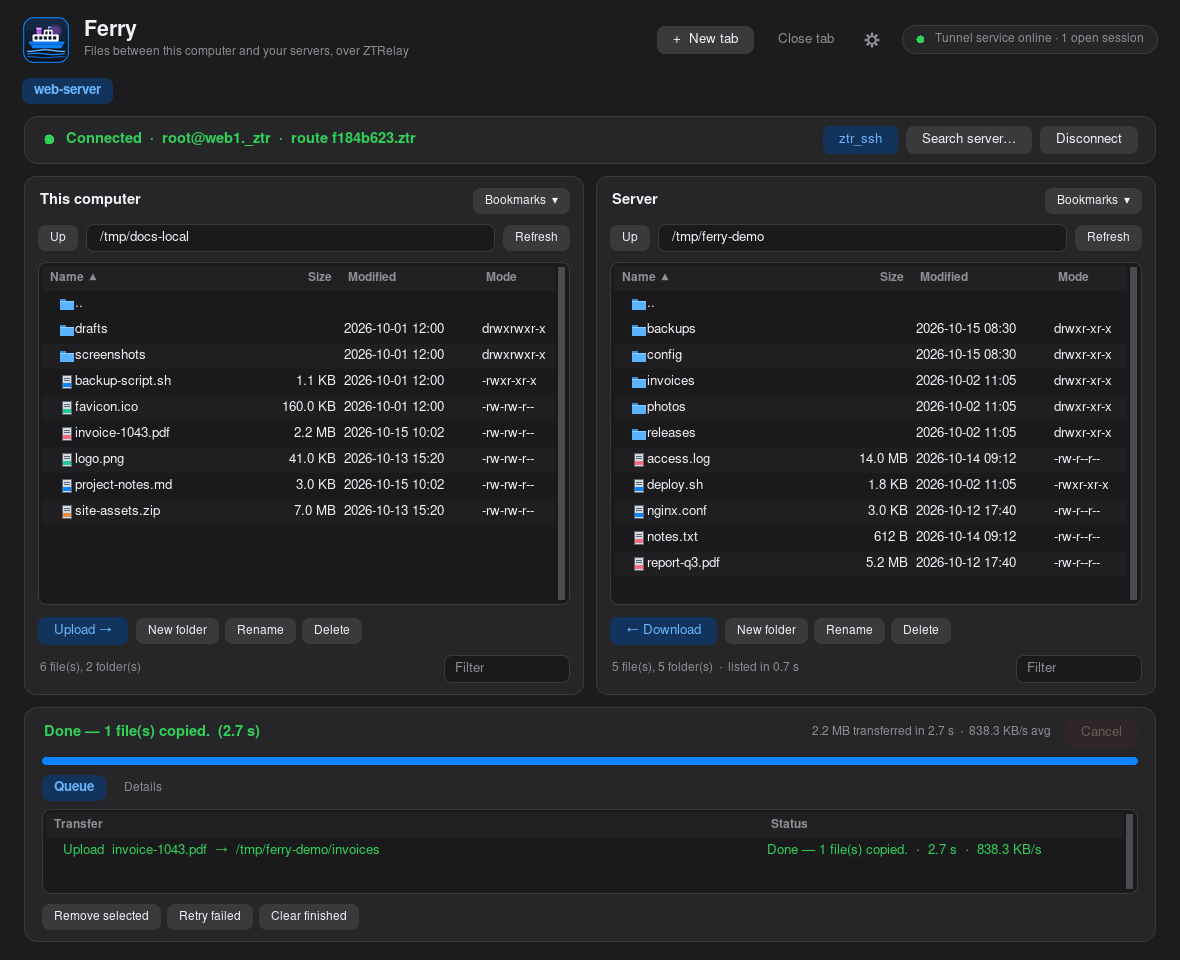
ztr_ferry                 # opens Ferry; the terminal comes straight back
ztr_ferry --foreground    # stay attached to the terminal and show errors live
Add it with the installer's --with-ferry (or answer y when it
asks): a launcher and icon go into your applications menu on Linux, and
Ferry.app into ~/Applications on a Mac. It runs on a Linux or
macOS desktop and needs Python's Tk, rsync and ssh.
What it does for you
- One sign-in per tab. Each tab asks the tunnel service for a session and opens a single
sshconnection through it. Listings, folder changes and every transfer reuse it. Passwords are handed tosshthrough a throwaway helper and never saved or written to disk. - Tabs, saved sites and bookmarks.
Ctrl+Topens a tab andCtrl+Wcloses it (⌘on a Mac). Saved sites and bookmarks are shared between tabs. - A transfer queue you can cancel, retry and clear. Transfers headed the same way are merged into one
rsync, so five files cost one start-up instead of five, and a few small files stream as a single archive over the open connection — much quicker on a slow route. Each transfer shows its elapsed time and average speed. - Settings (the cog, or
Ctrl+,): what to do when a file already exists (skip, overwrite if newer, overwrite), a speed limit, compression, preview-only, folder comparison, and hidden files. - A terminal on the server. The
ztr_sshbutton opens a terminal window into the server you're connected to — Terminal on a Mac — keeping its host key out of your~/.ssh/known_hosts, so several servers reached through the same tunnel address never look like a changed key. - Nothing about your servers is kept. Host keys for Ferry's own connections go in a throwaway file deleted with the connection, and each connection's temporary folder is deleted when it closes.
~/.config/ztr_ferry/ (no passwords).
FERRY_TERMINAL (for example xterm -e) chooses the terminal the
ztr_ssh button opens, and ZTR_FERRY_HOME moves the settings folder.
On a Mac, GNU tar (brew install gnu-tar) adds the faster path for
small transfers; without it Ferry uses rsync for those too.
ZTR Proxy — your browser through a route
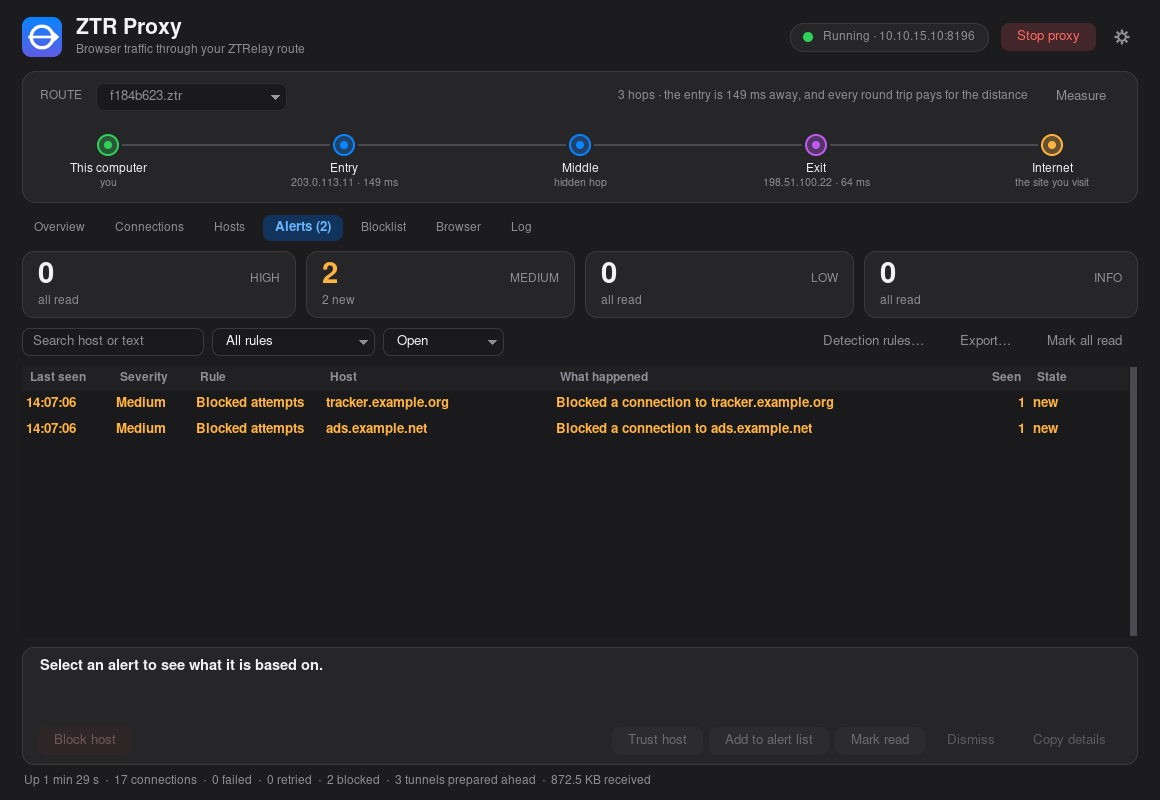
ZTR Proxy runs a local proxy and sends whatever uses it through one of your routes, with a
window to run it and watch it. Pick a route, press Start proxy, then open a
browser from the Browser page — Firefox, Chromium, Chrome, Brave, Edge or
Vivaldi, whichever is installed. It starts in a profile of its own with the proxy already set,
so your normal profile is left alone. One port speaks both an HTTP proxy and SOCKS5, so
curl, ssh and any other proxy-aware program can use it too.
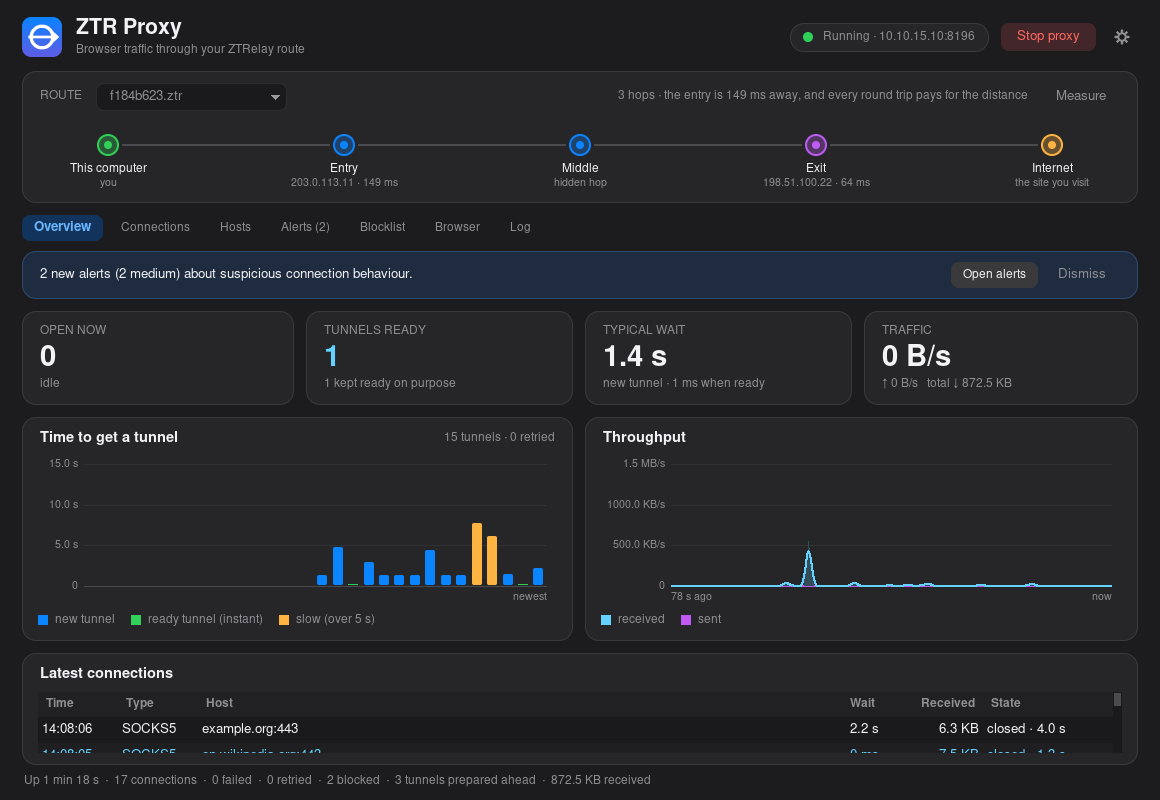
ztr_proxy                    # open the window; the terminal comes straight back
ztr_proxy --route NAME.ztr   # open it with a route from routes/ already chosen
ztr_proxy --start            # start the proxy as soon as the window opens
ztr_proxy --cli --config-file NAME.ztr   # no window: run the proxy in this terminal
Add it with the installer's --with-proxy: a launcher and icon in your applications
menu on Linux, ZTR Proxy.app in ~/Applications on a Mac. The window
runs on a Linux or macOS desktop and needs Python's Tk; ztr_proxy --cli needs
nothing beyond the client itself. It does not use the tunnel service — it authorizes its own
tunnels from a route file in routes/.
The address, and what passes through
By default it listens on 10.10.15.10 when this computer has that address (the one
--with-local-ip sets up) and on 127.0.0.1 otherwise, port
8095; the window shows the address in use. Use socks5h:// (curl:
--socks5-hostname) so the proxy looks names up for you instead of your computer.
curl -x http://127.0.0.1:8095 https://example.com/
curl --socks5-hostname 127.0.0.1:8095 https://example.com/
Plain HTTP is fully proxied: redirects reach your program instead of being followed, and cookies pass straight through without being kept. HTTPS and SOCKS5 are a blind byte relay — the TLS session runs between your program and the site, and the proxy never sees inside it.
The window
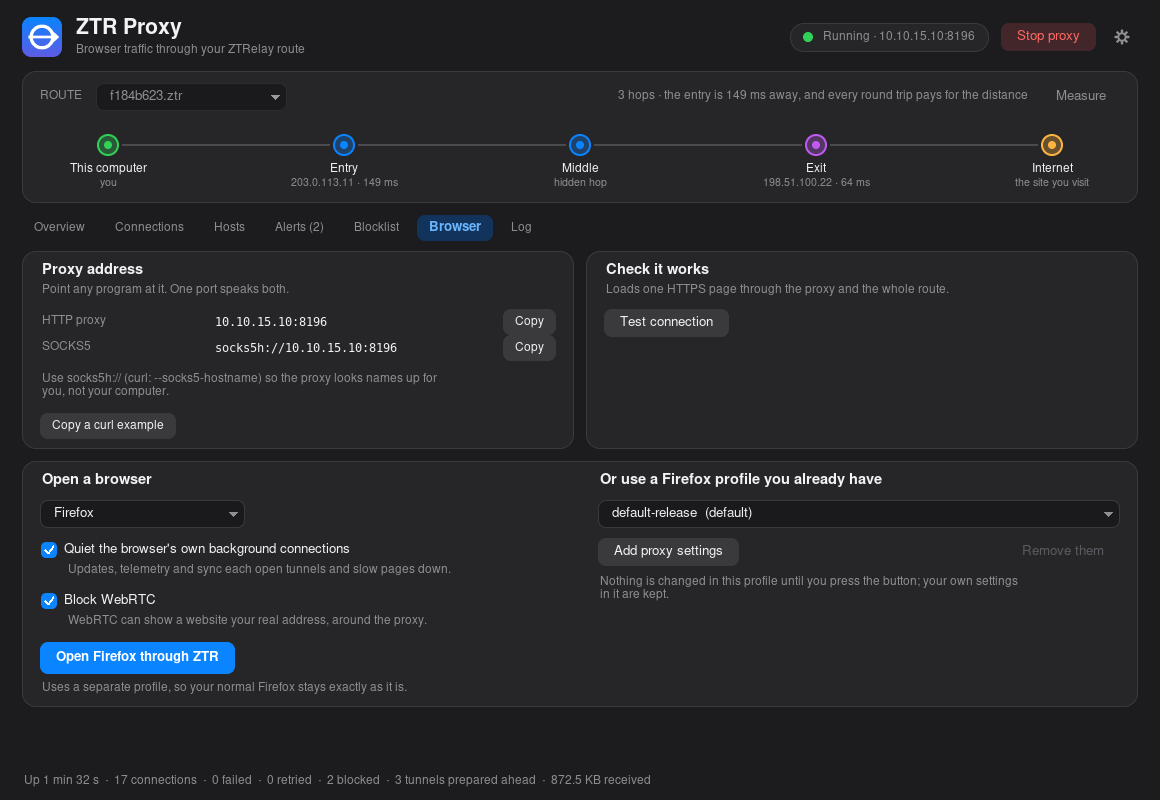
- Overview, Connections and Hosts show each connection as it opens and closes, how long its tunnel took to set up, the bytes each way, and the hosts you use most. A host can be kept ready so its first connection starts at once, and the route card shows each hop's round-trip time.
- Browser gives the proxy address with copy buttons, a connection test, and "Open browser through ZTR". Two options apply to the browser it opens: quieting its own background connections (updates, telemetry and sync checks each open a tunnel of their own), and blocking WebRTC, which can reveal your real address to a website. For Firefox it can also add the proxy settings to a profile you already use, and remove them again.
- Blocklist and Alerts. A blocked host is refused before any tunnel is opened. Patterns are
example.com(that name and everything under it),example.com:8443, an address, or a CIDR range, and lists in hosts-file or adblock format can be imported. The alert list names hosts you want to hear about without blocking them. Detection rules flag regular beaconing, far more data sent than received, bursts of random-looking names, remote-access ports, direct-to-address connections and repeated failures; every alert shows the evidence behind it, and a host you recognise can be marked trusted. - Rules. A rule says what to do when a host name contains some text: block it, alert you, or trust it.
trackermatchesad-tracker.netandtracker.example.com, and the text needs at least three characters. As you type, the page shows which of the hosts seen so far the rule would have matched. A rule can also match a name and everything under it, or an address or range. Everything on the Blocklist, Alert list and Trusted tabs is listed here too, and if several rules match, Block wins. In the entry boxes the same rule is writtencontains:tracker. - Hide names. The button in the top bar shows host names and addresses abbreviated everywhere in the window, like
w•••.e•••.comand203.•••.•••.•••, so a screen share or a photo of the screen doesn't show what you visit. It changes only what is displayed: filters and the Copy buttons still use the real names, and traffic is untouched. - Route and exit country. If a route's config names the country its exit is in, the route list reads
US · route.ztrand the exit hop on the route card is labelled Exit · US. - Idle connections. A browser keeps a connection open for a while after you close the page that used it, and each one holds a tunnel through your route. In Settings, Close idle connections after closes any connection that has been quiet for that many minutes; the browser opens a new one when it needs it. It is off by default, because anything that sits quiet on purpose, like an ssh session, would be cut too. The Connections list shows how long each connection has been idle, and Close idle closes everything quiet for 30 seconds.
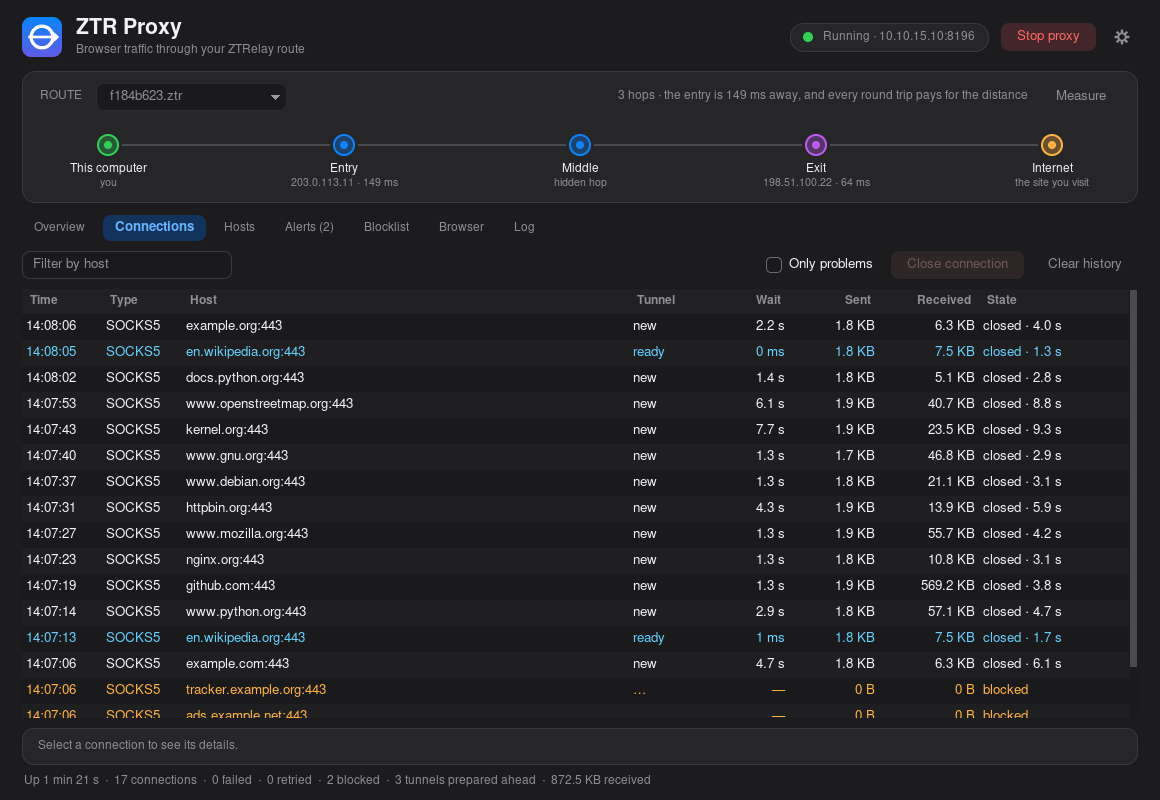
~/.config/ztr_proxy/
(ZTR_PROXY_HOME moves them), and everything stays on your computer. The command line
also takes --host, --port, --keep-ready HOST[:PORT],
--no-warm-pool, --warm-max-age, --warm-min-uses and
--idle-timeout SECONDS (0, the default, never closes a quiet connection);
ztr_proxy --cli --help lists them all.
ZTR Fleet — commands on many servers
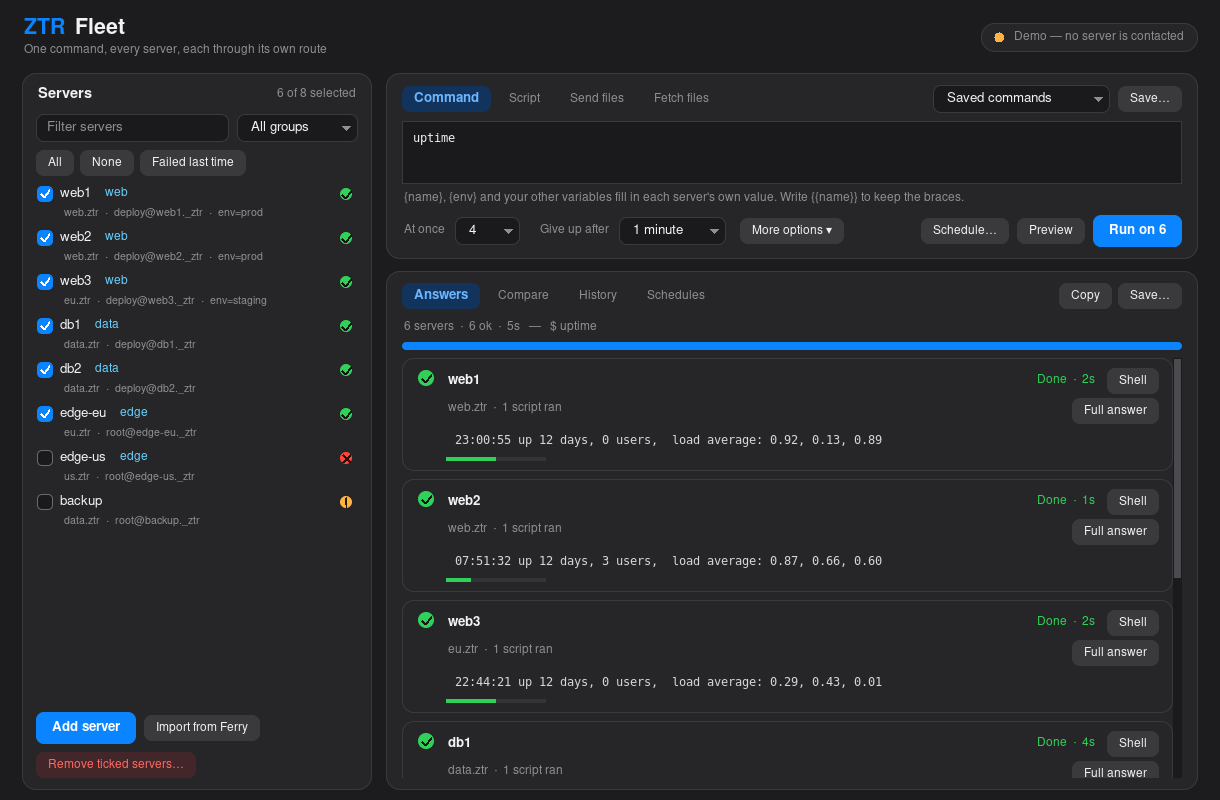
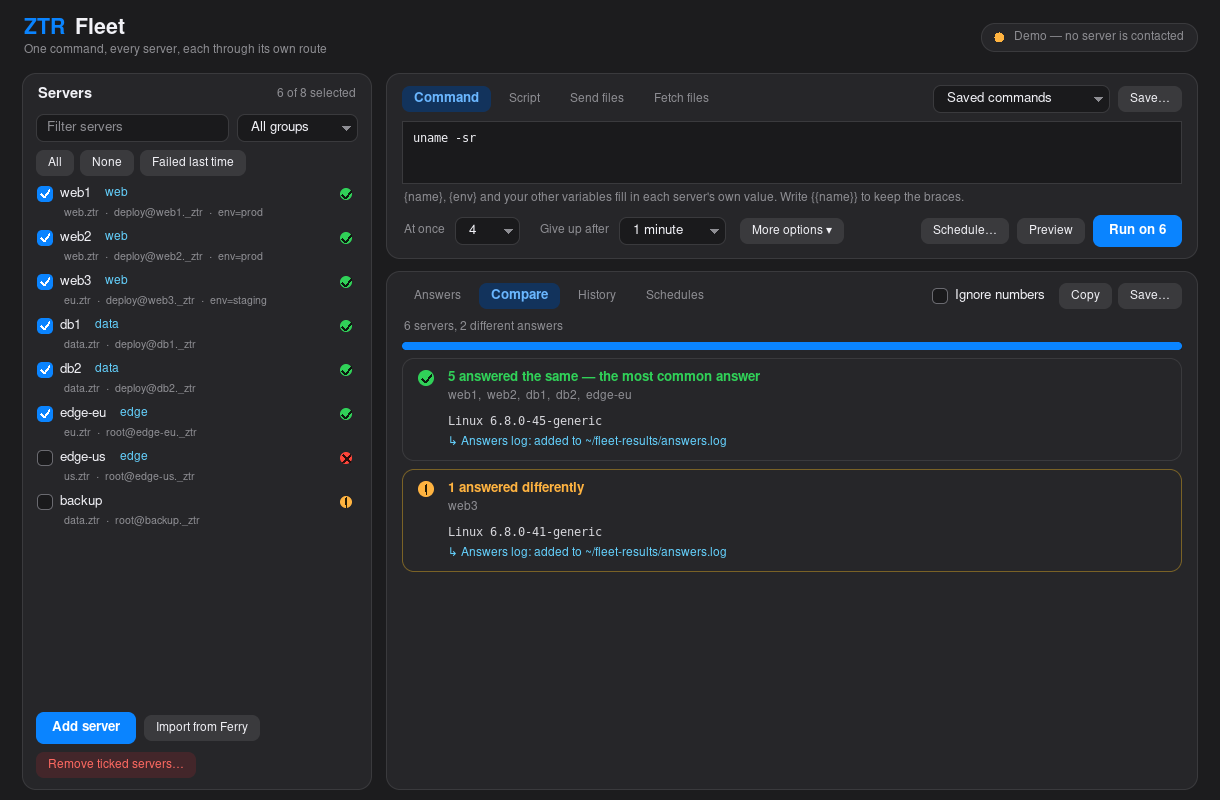
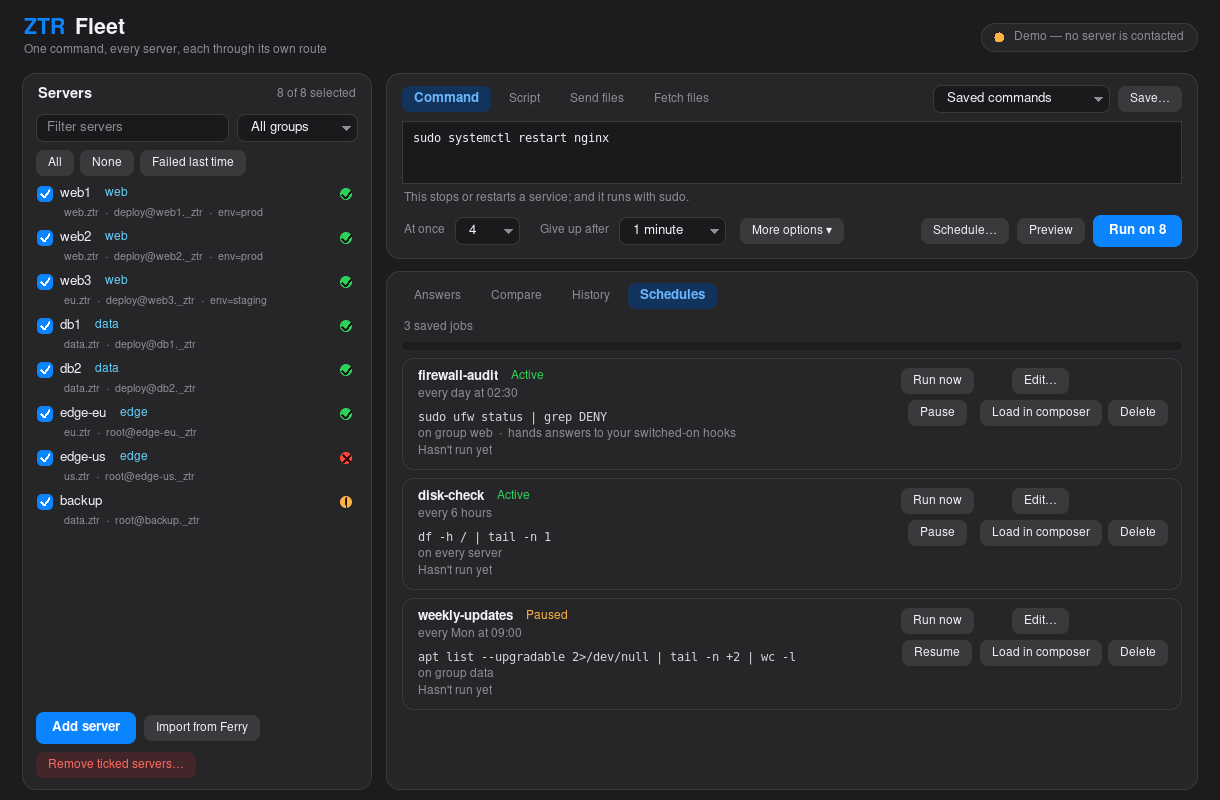
ZTR Fleet runs a command, a script or a file transfer on several servers at once, each one reached through its own route. Every server answers as it finishes, and you see which ones answered the same way and which didn't. It can roll a change out a few servers at a time and stop at the first failure, try failed servers again, open a terminal on any one of them, hand each answer to a script of your own, and repeat a run on a schedule. Everything has a command line and a window.
ztr_fleet 'uptime'                            # one command on every server
ztr_fleet --group web 'df -h /'               # only the servers in a group
ztr_fleet --script deploy.sh --batch 2        # a local script, two servers at a time
ztr_fleet --put app.conf --to /tmp/           # send a file to every server
ztr_fleet --get /var/log/syslog --into logs   # fetch a file from every server
ztr_fleet --shell web1                        # a terminal on one server
ztr_fleet --gui                               # the same thing in a window
The installer puts ztr_fleet on your PATH with the other commands.
It uses the tunnel service (so that needs to be running),
a route file in routes/ for each route you use, and ssh key login to your servers
— Fleet never types a password, apart from the sudo password you choose to send. The window
also needs Python's Tk, like Ferry. ztr_fleet --help
lists every option.
The fleet file
Your servers are listed in ~/.config/ztr_fleet/fleet.conf (or a
fleet.conf in the folder you run it from; --file picks another). One
per line: a name, the route file, the server's alias, the ssh user and port (-
for 22), then optional extras. The window can add, edit and remove servers, and import the
sites you saved in Ferry.
# name    route file     alias (--rh)       user     port   options
web1      web.ztr        web1._ztr          deploy   22     group=web env=prod
web2      web.ztr        web2._ztr          deploy   -      group=web env=staging
db1       data.ztr       db1._ztr           deploy   -      group=data key=~/.ssh/id_db
A command can use {name}, {alias}, {user},
{port}, {route}, {group} and your own variables
({env} above); each server fills in its own. A command that uses a variable some
server doesn't have is refused before anything connects, and {{name}} keeps the
braces. A script isn't rewritten — it receives the same values as ZTR_NAME,
ZTR_ENV and so on.
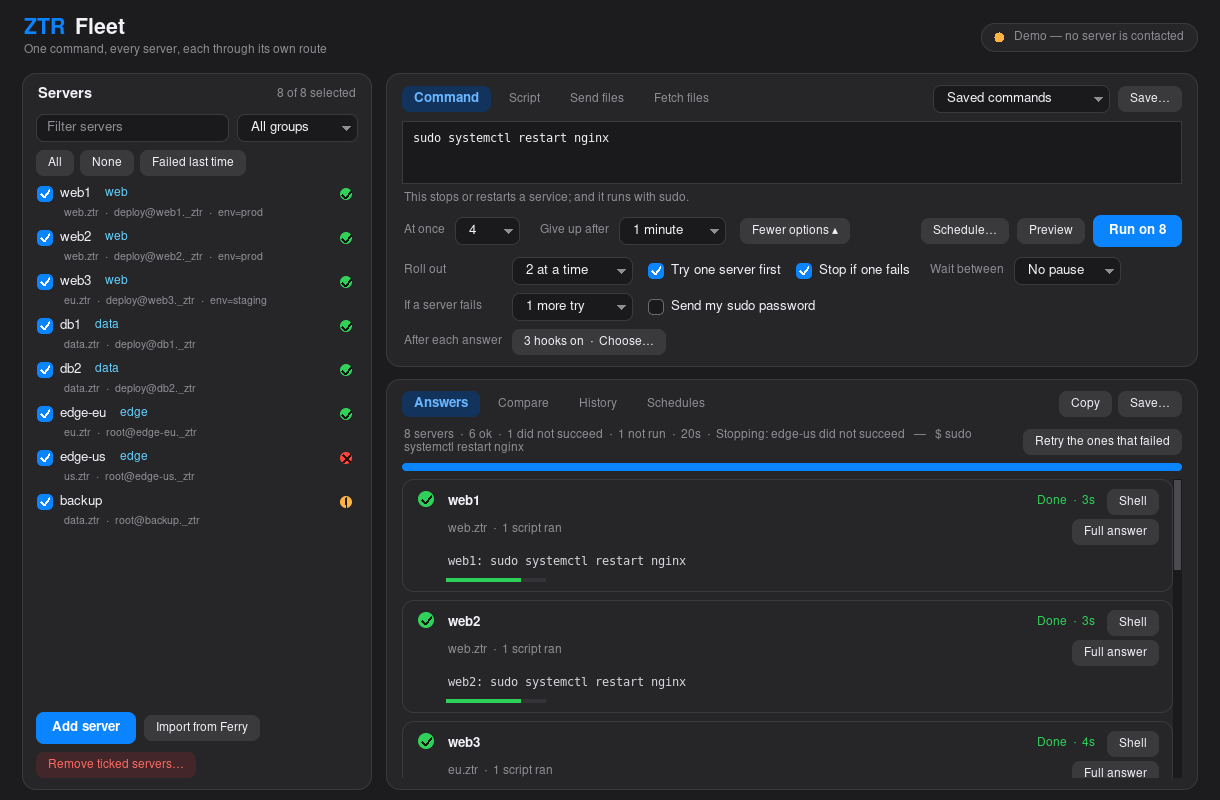
Rolling out safely
- Batches.
--batch Nruns N servers at a time and stops at the first failure; servers that never ran are marked as skipped.--canaryruns on one server first and goes on only if it succeeds,--pausewaits between batches, and--keep-goingcarries on past a failure. - Retries.
--retries Ntries a failed server again, up to N more times. - Look before you run. A command that looks destructive (
rm -r,mkfs, a reboot, dropping a database…) asks you to confirm first, or needs--yes.--dry-run, and the window's Preview, show what would run where — including the exact command used for each server — without contacting anything. - sudo.
--ask-sudoasks for your sudo password once and sends it to sudo on each server;--sudo-eachasks for a different one per server. The password travels only over the ssh connection and is never put in a command line or a file. A server with passwordless sudo never uses it. - Output. Each result prints as soon as its server finishes (
--orderedwaits and prints them in file order);--jsonprints one line per server, and--out DIRalso saves every server's output. The exit code is 0 when every server succeeded, 1 when any did not, and 2 when the fleet file or the setup is wrong.
Hooks: scripts that get the answers
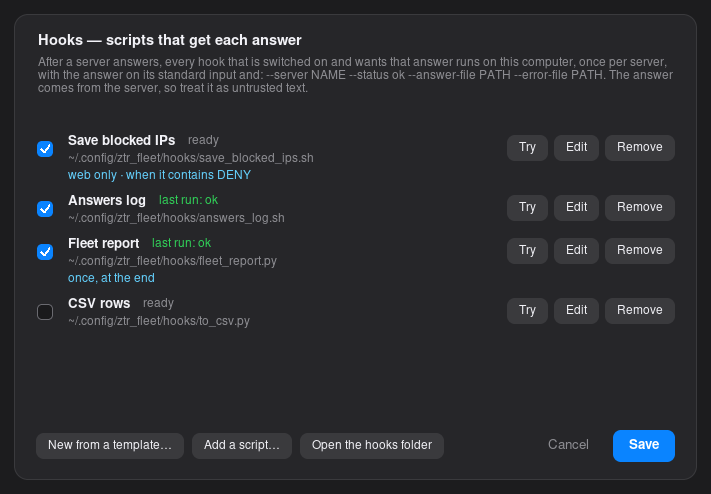
A hook is a script on your computer that Fleet runs with each answer — to save the IP addresses a firewall reports, add a row to a CSV, or raise an alert.
ztr_fleet --hook ./save_ips.sh 'sudo ufw status | grep DENY'- One per server. A hook runs after each server answers. It receives the answer on standard input, and
--server NAME --status ok --answer-file PATH --error-file PATHas arguments; the server's values are inZTR_NAME,ZTR_ALIAS,ZTR_USERand the rest. It is started without a shell, in its own folder, and stopped after 60 seconds. - Once at the end.
--hook-all SCRIPTruns a script once the whole run is done, with every answer as JSON on standard input and in--results-file— for a report. - Only when it matters. Hooks normally run for servers that succeeded;
--hook-failedincludes the others. In the window each hook can be limited to certain servers or groups, or to answers that contain a word or pattern. - Next steps. A hook can propose a follow-up by printing a line such as
FLEET-NEXT {"title": "Block 203.0.113.7", "command": "sudo ufw deny from 203.0.113.7", "all": true}(use"servers": [...]or"group": "web"to name the targets). Fleet shows these for you to review and never runs one by itself.
In the window, More options → After each answer opens the hook manager. It
lists your hooks with a switch each; you can add a script, or start from a template (save the
IP addresses in an answer, add every answer to a log, save each server's answer in its own
file, add a CSV row per server, or a blank script), set what each one runs for, and
Try a hook on a real or sample answer before using it for real. Scripts you
drop in ~/.config/ztr_fleet/hooks/ appear in the list switched off.
Scheduled runs
Set up a run, press Schedule…, and it repeats every few minutes or hours,
every day, or every week. The Schedules tab lists the saved jobs with their
next and last run, and can run, edit, pause, load or delete each one. A scheduled run goes to
your switched-on hooks like any other run, and its answers are kept in History.
ztr_fleet --list-jobs lists the saved jobs and ztr_fleet --run-job NAME
runs one exactly as saved.
loginctl enable-linger $USER keeps it running after you log out. A scheduled run
can't ask for a sudo password, so use passwordless sudo for those, and a destructive command is
confirmed once, when you save the job.
~/ztrclient. Each job's output is kept in ~/.config/ztr_fleet/logs/ (the
Schedules tab has a Log button), and a schedule that is on but can't start says why instead of
"Hasn't run yet".
The window
- Answers, Compare and History. Each answer has a Full answer button for long output; Compare groups servers that answered the same way (with an option to ignore numbers); History keeps recent runs to look at or run again.
- Retry the ones that failed runs it again on just those servers.
- A terminal on any server. The Shell button on each answer opens a terminal on that server through its route. Set
FLEET_TERMINAL(for examplexterm -e) to choose the terminal program. - Exit country. A route whose config names its exit country shows it next to the route name in the server list, the Add and Edit dialog and the previews, and typing
usin the server filter finds the servers that leave in the US. The server list and each answer also show the country as a small flag (about 70 countries; any other shows its two-letter code). - Saved commands, Copy and Save… for the answers, and a status light for the tunnel service.
~/.config/ztr_fleet/ (ZTR_FLEET_HOME moves them): the
fleet file, saved commands, history (readable only by you, since answers can hold anything a
command printed), your hooks and saved jobs. Each server's ssh host key is kept under its own
name in known_hosts there, so the changing tunnel ports never look like a new
server, and a key that changes is refused.
Why a target app
Everything before this point reaches something that already exists — a real
sshd, a real psql. A target app flips that: you write and
deploy the thing being reached yourself, on a machine you control, and talk to it
through the tunnel on your own terms. ztr_requests.py below is one
example of the pattern, not the only thing it's good for.
End-to-end between you and the target, on keys only the two of you hold — independent of the relay's own hop-to-hop encryption.
Not just reaching the target — acting from its network/IP and local resources, on your behalf.
You're writing both sides, so you're not limited to raw TCP passthrough — build whatever app-level protocol the job actually needs.
Built on the same route/tunnel authorization as everything else on this page — no separate auth system to stand up.
Get the apps
ztr_requests.py, ztr_stream.py, ztr_mailbox.py,
and ztr_worker_pool.py live in their own repo,
ztrapps
— kept separate from ztrclient since these are optional examples, not part
of the core client. Each one imports RelayClient and crypt_bot
from ztrclient, resolved as a sibling directory, so clone both into a shared parent
folder:
mkdir ztrelay && cd ztrelay
git clone https://github.com/igenius21fm/ztrapps.git apps

# ztrclient as a sibling of apps/ — the repo nests the package one level
# deep, so pull just that folder up and drop the rest:
git clone https://github.com/igenius21fm/ztrclient.git ztrclient-src
mv ztrclient-src/ztrclient ztrclient && rm -rf ztrclient-src

# run the installer once to set up the shared venv both apps/ and
# ztrclient/'s own plugins use:
cd ztrclient && ./installer.sh && cd ..
You should end up with:
ztrelay/
├── apps/                 github.com/igenius21fm/ztrapps
│   ├── ztr_requests.py
│   ├── ztr_requests_client.py
│   ├── ztr_stream.py
│   ├── ztr_stream_client.py
│   ├── ztr_mailbox.py
│   ├── ztr_mailbox_client.py
│   └── ztr_worker_pool.py
└── ztrclient/            github.com/igenius21fm/ztrclient
    ├── ztrClient.py
    ├── launcher.py
    ├── plugins/
    └── utils/crypt_bot.py
Run any app with the venv the installer just set up (it already has
pycryptodome and requests installed):
~/.local/share/ztr/ztr_venv/bin/python3 apps/ztr_requests.pyztr_requests.py — apps/ztr_requests.py
A different shape from the plugins above: those run on your machine and
reach a target through the tunnel. ztr_requests.py runs
on the target — something you deploy yourself on a machine you
control, that accepts HTTP request specs over the tunnel, executes them from that
machine, and returns the response. Useful when you want requests to actually
originate from the target's network/IP, not just reach the target.
Listens on a plain TCP port (default 9999) for exactly one thing: a
JSON request spec (method, url, headers,
body, cookies, timeout), which it runs with
requests and sends back as status_code/headers/body.
Independent of the relay's own hop-to-hop encryption, every message is additionally
RSA sign-and-encrypted (via crypt_bot.CryptBot) end-to-end between this
service and whoever's talking to it — see Wire protocol.
cd apps
~/.local/share/ztr/ztr_venv/bin/python3 ztr_requests.py
Key exchange & setup
Deploy the whole ztrelay/ folder from Get the
apps to the target, not just apps/ztr_requests.py on its own — it
imports crypt_bot.py from ztrclient/utils/ as a sibling
directory.
-
Run
ztr_requests.pyonce on the target. It generates its own keypair on first start —privateKey.pem/publicKey.pem, next to the script — and starts listening even before the next steps are done. - Copy the target's
publicKey.pemto whereverztr_requests_client.pyruns, astarget_pub.pem. - Run
ztr_requests_client.pyonce (or constructZtrRequestsClient) — it generates its own keypair the same way,privateKey.pem/publicKey.pemnext to it. - Copy that
publicKey.pemback to the target, asboss_pub.pemnext toztr_requests.py.
Wire protocol
One frame, either direction: flag (1 byte) + length
(4 bytes, big-endian) + an encrypted payload of that length.
| Field | Meaning |
|---|---|
flag | 1 if the payload is gzip-compressed before encryption, 0 if sent as-is. Messages under 200 bytes skip compression. |
length | Byte length of the encrypted payload that follows. |
| payload | crypt_bot.encrypt_sign_BytesPayload() output — RSA-signed and RSA/AES-encrypted, the ciphertext, encrypted AES key, IV, and signature joined by a delimiter. Decrypt with decrypt_msg_verifyBytesPayload(). |
This frame is the payload passed to client.send_HTH() / read back from
client.recv_HTH() — the relay tunnel's own framing is a separate, outer
layer that's already gone by the time a message reaches
ztr_requests.py's socket. Once decrypted, the JSON itself is:
{"request": {"method": "GET", "url": "https://example.com", "headers": {}, "body": null, "cookies": {}, "timeout": 30}}{"status_code": 200, "headers": {"Content-Type": "application/json"}, "body": "...", "is_base64": false}
is_base64 is true when the body couldn't be decoded as
UTF-8 text, in which case body is base64. A request body can be sent
the same way by setting is_base64: true on the request side too.
ztr_requests_client.py — apps/ztr_requests_client.py
The counterpart that talks to ztr_requests.py through an authorized tunnel. As a library:
from ztr_requests_client import ZtrRequestsClient

with ZtrRequestsClient(
    config_file="16efc170.ztr",
    target_host="example._ztr",   # the target running ztr_requests.py
    worker_prefix="",             # required — see below
) as client:
    resp = client.get("https://example.com")
    print(resp.status_code, resp.json())
Or as a one-off from the command line:
python3 ztr_requests_client.py GET https://example.com \
    --config-file 16efc170.ztr --target-host "example._ztr" \
    -H "Authorization: Bearer ..."
class ZtrRequestsClient
ZtrRequestsClient(
    config_file: str,
    target_host: str,
    worker_prefix: str, # required — see with_worker_id's note below, even if worker_id is unused
    port: int = None, # this tunnel's own listening_port — omit to auto-select from hop_settings.services_ports
    target_port: int = 9999, # exit hop's real destination port — 9999 is ztr_requests.py's own listening default
    own_private_key: str = None,   # default: privateKey.pem next to this script
    own_public_key: str = None,    # default: publicKey.pem next to this script
    target_public_key: str = None, # default: target_pub.pem next to this script
    timeout: int = 30,
    timing_defense: bool = False, # ask the hop chain for delay-jitter + decoy traffic
    worker_id=None, # set this to a distinct value per instance if you pool several — see below
)
port and target_port aren't the same thing — port
is this tunnel's own listening_port (leave it out and RelayClient
auto-selects one from hop_settings.services_ports); target_port
is where the exit hop actually connects at target_host, independent of
port, and defaults to 9999 here specifically because that's
where ztr_requests.py itself listens by default — not because it falls back
to whatever port happens to be. worker_prefix is required even
when worker_id is unused — a bare worker id is only unique within one pool of
these; the prefix is what keeps two separate pools from colliding with each other.
If ztr_requests.py is actually listening on a different port than
9999 at target_host, pass target_port:
with ZtrRequestsClient(
    config_file="16efc170.ztr",
    target_host="example._ztr",
    worker_prefix="",
    target_port=8080,   # ztr_requests.py is actually listening on :8080 here
) as client:
    resp = client.get("https://example.com")
Same override from the command line:
python3 ztr_requests_client.py GET https://example.com \
    --config-file 16efc170.ztr --target-host "example._ztr" --target-port 8080 \
-H "Authorization: Bearer ..."connect()— authorizes the tunnel and opens the socket. Returnsself; also runs automatically when used as a context manager.request(method, url, headers=None, body=None, is_base64=False, cookies=None, timeout=30)— sends one request, returns aZtrResponse.get()/post()/put()/delete()/patch()are shorthands for this with the method fixed. Abytesbody is base64-encoded automatically.close()— closes the socket. One instance can send many requests over the same connection before closing.
worker_id,
and give the pool itself a distinct worker_prefix (required, even for a
single instance). create_tunnel_id() hashes both in — a bare
worker_id is only unique within one pool; without a distinct
worker_prefix, two separate pools against the same route/target compute
identical tunnel IDs for their same-numbered instances and can end up sharing each
other's cached sessions. See
ztr_worker_pool.py's usage section for a pooled example.
class ZtrResponse
status_code,headers,error— read straight from the target's response.ok—Trueif there's noerrorandstatus_codeis 200–399.content— response body asbytes(base64-decoded if needed).text— response body asstr.json()—json.loads(text).
ztr_stream.py — apps/ztr_stream.py
A simple video-streaming target: same deployed-on-a-machine-you-control shape as
ztr_requests.py, but chunked instead of request/response — it reads a
video file off disk in fixed-size pieces and sends each one as it's read, rather
than buffering the whole file in memory first, which doesn't scale once "response
body" means a video instead of a JSON blob. No transcoding, no adaptive bitrate, no
seeking — the simplest thing that lets a client pull a file through an authorized
tunnel and either save it or pipe it straight into a player.
Serves whatever's in a videos/ directory next to the script. Two
commands: list (what's on the target) and stream (send
one file, chunk by chunk). Same key exchange as ztr_requests.py — see
its Key exchange & setup section, identical
process, just against ztr_stream.py's own keypair.
cd apps
~/.local/share/ztr/ztr_venv/bin/python3 ztr_stream.py
As a library, on the client side:
from ztr_stream_client import ZtrStreamClient

with ZtrStreamClient(
    config_file="16efc170.ztr",
    target_host="example._ztr",   # the target running ztr_stream.py
    worker_prefix="",             # required — see ZtrRequestsClient's note above
) as client:
    print(client.list_videos())
    with open("clip.mp4", "wb") as f:
        client.stream_video("clip.mp4", f)
Or from the command line — -o - pipes straight into a player instead of saving to disk:
python3 ztr_stream_client.py --config-file 16efc170.ztr --target-host "example._ztr" list
python3 ztr_stream_client.py --config-file 16efc170.ztr --target-host "example._ztr" get clip.mp4 -o - | ffplay -i -
Same port/target_port distinction as ZtrRequestsClient
— port is left out to auto-select, and target_port defaults to
9998 (where ztr_stream.py itself listens by default). If
ztr_stream.py is actually listening on something other than 9998,
pass target_port (or --target-port on the command line):
with ZtrStreamClient(
    config_file="16efc170.ztr",
    target_host="example._ztr",
    worker_prefix="",
    target_port=7000,   # ztr_stream.py is actually listening on :7000 here
) as client:
print(client.list_videos())ztr_requests.py's JSON
payloads are — video is already-compressed binary, so gzipping it again would just
burn CPU on both ends for no size reduction.
ztr_worker_pool.py — apps/ztr_worker_pool.py
Everything above authorizes and uses one tunnel at a time. This is the
piece that turns that into N tunnels at once — a small pool of
RelayClient workers, each pre-authorized against the same route/target,
handed out to whichever thread needs one and given back when it's done. Useful the
moment something needs real concurrency through the relay: fetching many assets in
parallel (see Build your own's mirroring idea),
batch operations against one target, or a gateway service fronting many client
requests through a fixed set of authorized tunnels.
Pinned to one target_host/port/config_file per
pool — many workers, one target, not a general multi-target pool. Concurrency is
capped at however many workers you create; nothing scales that number up under load
on its own.
API reference
class RCWorkers
RCWorkers(
    target_host: str,
    config_file: str,
    worker_prefix: str, # e.g. "mirror-" so worker_ids read as "mirror-0", "mirror-1"...
    port: int = None, # each worker's own listening_port — omit to auto-select per worker (see below)
    n: int = 2,
    target_port: int = None, # exit hop's real destination port, if different from `port`
    override: Callable[[RCTimer], None] = None, # runs on each worker before it authorizes
)port moved after worker_prefix so it
could get a default — a caller passing all four positionally
(RCWorkers(host, port, config_file, prefix)) needs to switch to
RCWorkers(host, config_file, prefix, port=...) or keyword arguments
throughout. timing_defense/secure_transport were removed in
favor of override — see below.
Creates n workers and authorizes each one's tunnel up front. A worker
that fails to authorize (rejected, or the hop chain unreachable) stays in the pool
in a "broken" state rather than being dropped — it gets the same
recovery chance as a worker that breaks later, instead of permanently shrinking
the pool's capacity.
override is called on each worker (an RCTimer, which is a
RelayClient) right after with_worker_id() and before that
worker authorizes — the place to call any other RelayClient setup method
uniformly across the pool:
pool = RCWorkers(
    target_host="example._ztr",
    config_file="16efc170.ztr",
    worker_prefix="secure-",
    n=4,
    override=lambda w: w.with_timing_defense().with_encryption("target_pub.pem"),
)
worker_prefix is required, not just decoration — a bare
"0", "1", "2"… is only unique
within this pool. create_tunnel_id() hashes the worker id in,
so two separate RCWorkers pools against the same target/route/ttl with
no prefix would compute identical tunnel ids for their same-numbered workers, and
could end up sharing each other's cached sessions. The prefix is what keeps pools
distinct from each other, not just workers within one pool.
port and target_port aren't the same thing —
RelayClient defaults TARGET_PORT (what the exit hop
actually dials at target_host) to whatever port is, but
port also does separate duty as this tunnel's listening_port.
Pass target_port when the pool needs to reach a destination port that
isn't port — it's applied to every worker via
RelayClient.set_target_port(), before that worker is authorized (it's
baked into the tunnel id and the hop authorization request itself, so setting it
afterward would have no effect).
port out lets each worker auto-select independently from
hop_settings.services_ports (see RelayClient)
— good for spreading the pool's own tunnels across ports, but it means each worker's
TARGET_PORT also defaults independently to its own auto-picked
port, unless you pass target_port explicitly. For a pool
meant to reach one destination service, always pass target_port when
port is left auto-selecting — otherwise different workers can end up
dialing different ports at target_host.
acquire_worker(wait_timeout=None)— blocks until a worker is free, marks it busy, returns it. RaisesTimeoutErrorifwait_timeoutis given and nothing frees up in time.release_worker(worker)— hands a worker back to the pool. A worker left in a"broken"state (see below) stays broken, not freed.
class RCTimer(RelayClient)
A RelayClient that tracks its own state — "free",
"busy", or "broken" — and when it last changed. Any
exception out of send_HTH/recv_HTH marks it
"broken" automatically; the pool re-authorizes broken workers on a
cooldown (HEAL_COOLDOWN_SECONDS, 5s by default) rather than retrying
every single time a caller asks for a worker and finds none free.
rc_task(rcw, _start, on_failure=None, on_success=None, *args, **kwargs)
The convenient path — acquires a worker, calls
_start(worker, *args, **kwargs), fires
on_success(worker, result) or on_failure(worker, error),
and always releases the worker afterward, success or failure.
Usage
from ztr_worker_pool import RCWorkers, rc_task
import socket

# n workers, each authorizing its own tunnel up front — port omitted, so each
# worker auto-selects from hop_settings.services_ports; target_port pins every
# worker to the same real destination regardless of which port it landed on
pool = RCWorkers(target_host="example._ztr", target_port=9999, config_file="16efc170.ztr", worker_prefix="mirror-", n=4)

def fetch(worker, message: bytes):
    with socket.create_connection((worker.entry_hop, worker.PORT), timeout=10) as sock:
        worker.send_HTH(sock, message, worker.session_id)
        response, session_id = worker.recv_HTH(sock)
        return response

def on_success(worker, result):
    print(f"got {len(result)} bytes back")

def on_failure(worker, error):
    print(f"failed: {error}")

# safe to call from many threads at once, up to n concurrent in flight
result = rc_task(pool, fetch, on_failure, on_success, b"hello through the tunnel")
If the exit hop needs to reach a different port than port itself — say,
a Postgres pool that should dial 5432 at the target regardless of
whatever port each tunnel's own bookkeeping (auto-selected or not) uses — pass
target_port:
pool = RCWorkers(
    target_host="example._ztr",
    config_file="16efc170.ztr",
    worker_prefix="pg-",
    n=4,
    target_port=5432,
)
For manual control — e.g. holding one worker across several calls:
worker = pool.acquire_worker(wait_timeout=10)  # raises TimeoutError if none free in time
try:
    ...  # use worker.send_HTH / worker.recv_HTH yourself
finally:
    pool.release_worker(worker)
Pooling ZtrRequestsClient instead
RCWorkers pools raw RelayClient tunnels for when you're
speaking your own wire protocol on top (like the manual example above, talking
directly to ztr_requests.py's framing). If you're already using
ZtrRequestsClient, it's simpler to
just pool instances of it directly — no manual framing needed, since
.get() already handles that:
import concurrent.futures, queue
from ztr_requests_client import ZtrRequestsClient

N_WORKERS = 8
pool = queue.Queue()
for i in range(N_WORKERS):
    client = ZtrRequestsClient(
        config_file="16efc170.ztr",
        target_host="example._ztr",
        worker_prefix="reqpool-",  # keeps this pool distinct from any other
        # port left out — each instance auto-selects from hop_settings.services_ports,
        # spreading this pool's own tunnels across the available entry-hop ports;
        # target_port still defaults to 9999 regardless, so they all reach the same place
        worker_id=i,  # distinct per instance — see ZtrRequestsClient's note above
    ).connect()
    pool.put(client)

def fetch(url):
    client = pool.get()
    try:
        return client.get(url)
    finally:
        pool.put(client)

urls = ["https://example.com/", "https://example.com/style.css", "https://example.com/script.js"]
with concurrent.futures.ThreadPoolExecutor(max_workers=N_WORKERS) as ex:
    results = list(ex.map(fetch, urls))

for url, resp in zip(urls, results):
    print(url, resp.status_code, len(resp.content))
queue.Queue is the pool here — thread-safe get/put with no extra code
needed, since ZtrRequestsClient already owns its connection and crypto.
RCWorkers gives you
that a plain queue.Queue of clients doesn't. First, protocol independence
— ZtrRequestsClient only speaks ztr_requests.py's protocol;
for anything else (a different target app, a custom binary protocol,
send_HTH/recv_HTH directly) you need raw
RelayClient tunnels, which is what RCWorkers pools. Second,
self-healing — a queue of plain clients has no recovery built in, so a client whose
tunnel breaks mid-run just keeps getting handed out and failing until you write your
own reconnect logic; RCWorkers tracks broken workers and reauthorizes them
automatically. If neither applies — you're specifically doing HTTP through
ztr_requests.py and don't need automatic recovery — the plain
queue.Queue version above is simpler and there's no reason to reach for
the extra machinery.
ztr_mailbox.py — apps/ztr_mailbox.py
A simple async drop-box, in the shape SecureDrop popularized: Bob submits a message to Alice without either of them having a prior relationship, gets back a one-time claim token, and checks back later for a reply — no real-time chat. Simultaneity is itself a deanonymization signal (two parties online at the same moment narrows who they could be), so this is deliberately async: submit now, reply whenever, check back whenever, with no expectation either side is present at the same time as the other.
Structurally different from ztr_requests.py/ztr_stream.py:
those assume one pre-authenticated identity on each side, exchanged once before the
first connection. A drop-box needs the opposite — Bob should be able to submit
without a prior relationship. So there's no crypt_bot identity/signing
layer on the wire here at all; instead:
The mailbox process only ever holds Alice's public key — never her private key, which stays entirely on a separate machine. Even a fully compromised mailbox can't decrypt a single thing it's storing.
No usernames, no accounts. A submission gets a random claim token and a fresh, one-time reply keypair — both exist only for that one submission.
Losing your claim token or saved reply key loses that submission for good. Nothing about the design lets it be recovered — that would mean someone else could too.
Submissions are stored keyed by sha256(token), never the raw token — a seized or leaked mailbox can't be used to enumerate valid claim tokens.
Setup
- Alice runs
python3 ztr_mailbox_client.py genkeyonce, offline — writesalice_priv.pem(keep this off the target machine entirely) andalice_pub.pem. - Run
ztr_mailbox.pyon the target. It never needs any of Alice's keys, not even her public one — no key exchange with Bob either, that's the point. -
When Alice registers
alice_mailbox._ztr(dashboard's Address Aliases panel), she pastesalice_pub.pem's contents and the mailbox's port into that alias's services metadata. This is the only place her pubkey lives publicly — Bob looks it up himself from the dashboard's Alias lookup tool, before he's authorized any tunnel at all. He passes it tosubmitwith--alice-pubkey.
{
  "services": {
    "mailbox": {
      "port": 9997,
      "transport": "tcp",
      "encryptions": { "pubkey": "-----BEGIN PUBLIC KEY-----..." }
    }
  }
}._ztr alias (from the dashboard's Address
Aliases panel), not the target's raw IPv4 — Bob should never need or learn the real address
the process is running behind. Not a solid measure on its own (the exit hop still
knows the real IP, and nothing stops the target's own software from leaking it some
other way — see the Address Aliases panel's own note on this), but a cheap, useful extra layer on
top of everything else here.
Usage
# Bob: look up Alice's pubkey first, via the dashboard's Alias lookup tool
# (search "alice_mailbox._ztr"), then save the pubkey it shows to alice_pub.pem

# Bob: submit anonymously, save the token + reply key it prints
python3 ztr_mailbox_client.py --config-file bob.ztr --target-host "alice_mailbox._ztr" \
    submit "Here's what I found..." --alice-pubkey alice_pub.pem

# Bob: check back later for a reply
python3 ztr_mailbox_client.py --config-file bob.ztr --target-host "alice_mailbox._ztr" \
    check <token> --key-file mailbox_<token-prefix>.pem

# Alice: list what's new (decrypts locally with alice_priv.pem)
python3 ztr_mailbox_client.py --config-file alice.ztr --target-host "alice_mailbox._ztr" \
    list --key-file alice_priv.pem

# Alice: reply to one (reply_pubkey file was saved by `list` above)
python3 ztr_mailbox_client.py --config-file alice.ztr --target-host "alice_mailbox._ztr" \
    reply <submission-id> "Thanks, following up." reply_pubkey_<id-prefix>.pem --key-file alice_priv.pem
Same port/target_port distinction as
ZtrRequestsClient — --port (the tunnel's
own listening_port) is left out above and auto-selects from
hop_settings.services_ports. --target-port defaults to
9997, matching the port in the alias's own services metadata
above (where ztr_mailbox.py itself listens) — pass --target-port
only if Alice's mailbox is actually published on a different one:
python3 ztr_mailbox_client.py --config-file bob.ztr --target-host "alice_mailbox._ztr" --target-port 7997 \
submit "Here's what I found..." --alice-pubkey alice_pub.pemwith_timing_defense())
meaningfully raise the bar against timing-correlation deanonymization but don't fully
defeat a global passive adversary, and
check's lookup isn't proven constant-time, so response timing could in
principle distinguish a valid-but-unanswered token from a nonexistent one under
observation.
Security use cases
A target app makes a request from a network position you control — that property maps directly onto a set of blue-team problems, not just general connectivity ones:
- Segmentation validation — deploy a target inside a specific VLAN/segment and check what it can and can't reach, confirming segmentation is enforced rather than just documented.
- IP-allowlist verification — confirm a service that's supposed to reject everything except a trusted IP actually does, testing from both an allowed and a disallowed vantage point.
- Segmentation drift detection — periodic checks from multiple internal vantage points to catch unauthorized lateral reachability appearing over time.
- Out-of-band verification during IR — if the primary network path is suspect, a target on a separate trusted network gives you an independent channel to check service status without routing through it.
- Canary/honeytoken callback testing — confirm a planted canary's callback fires and reaches the right collector, from the network position it's supposed to trigger from.
- Threat-intel/IOC triage — see below.
IOC triage without exposing the SOC
Malicious infrastructure — phishing kits, C2 panels, drive-by pages — routinely fingerprints incoming requests before deciding what to serve: IP, ASN, geolocation, and known security-vendor/VPN/datacenter ranges get checked against reputation lists. Two things follow if that check flags the requester as a researcher rather than a victim:
- Cloaking — a benign page (or a 404, or a redirect to the real legitimate site) gets served instead of the actual payload, and the triage learns nothing.
- Tip-off — if the actor reviews hits, your organization's real IP/ASN showing up tells them they're being investigated, which can mean early infrastructure teardown or the campaign routing around your org specifically.
You also don't want the analyst's real workstation making the connection at all, in case the IOC turns out to be a live exploit rather than a static phishing page.
The request comes from the target, not the analyst — run it on a disposable VPS in a different provider/ASN than your corporate infrastructure.
requests.request() — no browser, no JS, no rendering. Status, headers, redirect chain, and raw body for a first pass, with nothing served by the page ever run.
End-to-end on keys only you and the target hold — even your own relay's hop operators never see the IOC or the response.
Add --timing-correlation-defense to ask the hop chain for delay-jitter and decoy traffic on this tunnel.
python3 ztr_requests_client.py GET "https://suspicious-phish.example/login" \
    --config-file soc-burner-route.ztr --target-host burner-vps._ztr \
    --timing-correlation-defense \
    -H "User-Agent: Mozilla/5.0 (Windows NT 10.0; Win64; x64) AppleWebKit/537.36 ..." \
    -H "Accept: text/html,application/xhtml+xml,application/xml;q=0.9,*/*;q=0.8"
The response comes back for offline analysis — hashing, IOC extraction — without a second live connection to the target infrastructure.
requests identifies itself as python-requests/x.y.z, itself a
non-browser signal, so pass realistic browser headers via -H yourself.
TLS client-hello fingerprinting (JA3) still differs from a real browser's, so this
doesn't defeat fingerprint-based cloaking, only IP/ASN/geo-based cloaking. And reusing
the same burner target across many investigations erodes the same opsec benefit as
reusing an analysis VM.
Build your own
ztr_requests.py proxies HTTP. That's one job out of many a target app
could do — same pattern (a listener on the target, its own client, keys exchanged
once), different job. A few starting points:
- Command runner — a fixed allowlist of scripts you can trigger remotely, instead of a full
sshsession. - File transfer — upload/download without opening
ssh/scpat all. - Backup trigger — kick off (and check the status of) a database or filesystem backup on demand.
- Log/metrics shipper — pull recent logs or a health snapshot, only when polled through the tunnel.
- Live feed streaming — extend
ztr_stream.py's file-chunking to a live source (webcam, screen capture, an ffmpeg pipe) instead of a static file, for real-time streaming rather than file transfer. - Local DNS/service lookup — resolve or query something only visible from the target's own network.
The full power of a ._ztr alias
Every alias started as one job: stand in for a real IPv4 so the client (and anything inspecting its traffic) never sees the address directly. That's still the core of it, but an alias is no longer just a hidden pointer — it can carry its own name, an expiry, a public directory of what's running behind it, and proof of who registered it.
Pro plans pick their own alias instead of a random 64-char hex string — alice_mailbox._ztr instead of a1f9c2e8…e701._ztr.
Forever, a fixed number of days, or an exact number of seconds — your own record of intent for the alias, shown back to you in the dashboard.
A public services directory attached to the alias itself — port, transport, a pubkey — so anyone who finds the alias can bootstrap a connection without a separate exchange.
Creating an alias hands back a key proving who registered it, saved for whatever future alias operations end up needing it.
Custom naming & expiry
By default, creating an alias mints a random 64-character hex string ending in
._ztr — collision-proof and meaningless to anyone who sees it. Pro
plans can instead supply their own label from the dashboard's Address Aliases panel: lowercase
letters, digits, and hyphens, up to 64 characters, must start and end with a letter or
digit. The ._ztr suffix is always appended for you, never typed.
Expiry is set at creation — forever, a preset of 7/30/90/365 days, or a custom number of seconds for finer control — and is currently display-only: the dashboard shows an "Expired" badge once the date passes, but nothing revokes the alias automatically yet. Treat it as your own record of intent until this is enforced automatically.
Services metadata
Any alias can carry a small public JSON document describing what's actually running
behind it — a services map, each entry naming a service and its
connection details:
{
  "services": {
    "mailbox": {
      "port": 9997,
      "transport": "tcp",
      "encryptions": { "pubkey": "-----BEGIN PUBLIC KEY-----..." }
    },
    "web": {
      "key@region": "us-east"
    }
  }
}port— defaults to2if omitted.transport—tcporudp, describing what the service behind this alias actually speaks; defaults totcpif omitted.encryptions.pubkey— a string, ornullif there isn't one yet; defaults tonull.key@anything— arbitrary custom fields, up to 64 characters each. Must be prefixed exactly this way to distinguish them from the fixed keys above.
{} for a service is valid and becomes
{"port": 2, "transport": "tcp", "encryptions": {"pubkey": null}}. The whole
document is capped at 1MB serialized.
This is what makes ztr_mailbox.py's
bootstrap work: Alice attaches her pubkey and port to alice_mailbox._ztr
itself, so Bob can discover both from the alias — publicly, before he's authorized any
tunnel at all, and without the mailbox target needing to hold or serve any of her key
material itself.
Looking up alias data
Metadata is public by design — the dashboard's Alias lookup tool
(its own view, under Address Aliases) looks up any ._ztr alias, not just ones you
own. Paste in an alias and it shows the services document attached to it, or reports
that none is attached.
Ownership
Every set_domain call now returns an ownership_key — a
string proving who registered that specific alias. The platform saves it against the
alias record the moment it's created (aliases that already existed before this were
backfilled with "no-owner"). It isn't used for anything user-facing yet,
but it's the kind of thing that matters the moment a future alias operation needs to
prove "this is mine" — better to have it recorded from day one than to backfill it
under pressure later.
IP & name rules
The IPv4 must be publicly routable. Loopback, private (RFC1918),
link-local — which includes cloud metadata endpoints like 169.254.169.254
— CGNAT, and other reserved ranges are all rejected before the alias is ever created.
An exit node resolving an alias to one of these could otherwise be made to reach into
your own infrastructure instead of the intended public target — the same class of risk
as SSRF in a web app, just routed through a relay hop.
Alias names — whether auto-generated or custom — are always
lowercase letters, digits, and hyphens, 1–64 characters, must start and end
alphanumeric, and must end in the literal ._ztr suffix, enforced
consistently wherever an alias gets created.
Glossary
- Hop
- One node in a route — entry, middle, or exit. Traffic passes through every hop, in order, on its way to your target.
- Entry hop
- The first hop. The only one your client ever connects to directly (
client.entry_hop). - Middle hop
- Any hop between entry and exit. Always addressed by a
._ztralias — the client never learns its real IP. - Exit hop
- The last hop. Connects to your actual target (
target_host:target_port) on your behalf. - Sentry
- The hop immediately before the exit (
client.last_middle_hop/__SENTRY__). ._ztralias- A per-route, per-hop domain standing in for a middle hop's real address, so the client (and anything inspecting its traffic) never sees that address directly. Randomly generated (a 64-char hex string) by default; Pro plans can instead pick their own alias in the dashboard's Address Aliases panel — lowercase letters, digits and hyphens, up to 64 characters, must start and end alphanumeric.
- Route
- The specific, authorized chain of hops your
.ztrconfig describes — fixed once downloaded; a new route means a new config file. - Tunnel
- An authorized, active path across your route to one specific target. Created by
set_tunnel(). - Tunnel ID
- A hash identifying one (route, hop order, ports, target, TTL, worker id, credentials) combination — the cache key
TunnelCachekeys authorizations on. - Session
- One on-demand tunnel managed by the local proxy service, identified by a
session_idand, in the plugin architecture, bound to its own ephemeral local port. - Worker ID
- A caller-supplied tag (
with_worker_id()) that keeps concurrent requests for otherwise-identical tunnels from colliding on the same cached tunnel id. - Native mode
- The framed transfer protocol (
send_HTH/recv_HTH), as opposed to raw, unframed streaming (native=False). - Local proxy service
ztr_tunnel_lp.py— the persistent process that turns on-demand tunnels into local TCP ports your own tools connect to.
FAQ
- Can I have several sessions open to different targets at once?
- Yes — that's the whole point of the local proxy service. Each
ztr_ssh/ztr_pg/ztr_forwardinvocation gets its own ephemeral local port, so they never collide, no matter how many are open. - Is this a VPN?
- No. A route is per-target, not system-wide — nothing routes through it unless you explicitly point a client at a tunneled port. There's no default-route or "protect all my traffic" mode.
- Does the exit hop see my real IP?
- No hop past the entry ever does — each hop only ever sees the address of the hop before it. The entry hop does see your real IP (it has to, to accept the connection); logging it is against platform policy.
- Can I add my exit node's IP to a third-party allowlist?
- Yes, but not as the only entry. Exit nodes can go down for reasons outside your control — scheduled maintenance, a node operator taking it offline, a full outage — and if that IP is your sole allowlisted address, you lock yourself out the moment it's unavailable.
- Do I need to re-authorize every time I connect to the same target?
- No —
set_tunnel()caches a successful authorization (TunnelCache) and reuses it until the TTL expires, so repeated connections to the same target are a local lookup, not a fresh round trip to every hop. - What happens if my connection drops mid-session?
- The tunnel fails along with it. For a wrapper (
ztr_ssh/ztr_pg/ztr_forward), just run it again. For directRelayClientuse, callset_tunnel(reset=True)to force a fresh authorization. - Does
ztrClient.pywork on Windows? - Not officially. It's built and tested on Linux and macOS, which are the platforms the installers and the persistent services (
ztr_tunnel_lp.py, the dashboard) support.ztrClient.pyitself is plain Python with no OS-specific calls, so it should mostly work standalone on Windows too — Python's file APIs accept forward slashes there as well — but treat that as unverified rather than supported.